
1. Common reasons for product delisting
To ensure a good shopping experience for consumers, the Jumia content team regularly inspects product content on the front end. If any product is found to violate the listing rules, it will be immediately removed from the shelves.
- The title content does not match the pictures
- Wrong category (for detailed category selection guidelines, please check here)
- Wrong brand selection (for detailed brand selection guidelines, please refer to the Brand Creation and Usage Guideline)
- Products suspected of being counterfeit, shoddy, or infringing (for relevant platform policies, please check here)
- Prohibited items (prohibited for sale or shipment) (for relevant platform policies, please check here)
- High return rate due to quality reasons (>5%)
- Suspicious prices (too low or too high)
- Pornographic or indecent products using inappropriate categories (for detailed category requirements, please check the following “Category Selection for Pornographic and Indecent Products”)
2. How to handle content QC failure due to variable errors?
- If the Shop SKU is not generated, the Variation can be modified (for details, please refer here), and QC will be re-triggered after saving.
- If the Shop SKU has been generated, the Variation cannot be modified. It is recommended to delete the product (update status to Delete) or take it off the shelves (update status to Inactive).
3. Brand restrictions and authorization
To sell branded products on Jumia, you must have brand authorization in the country where the selling site is located. The specific conditions are as follows:
- You are the owner or manufacturer of the brand or intellectual property.
- You are the sole authorized distributor of the brand and its products in the local area.
- You have exclusive rights to display, sell, and distribute the brand online.
- You possess and can provide documents, receipts, or proof of purchase for Jumia-prohibited/restricted brand products purchased from authorized distributors (click here to view the list of all prohibited and restricted brands on Jumia). To create a brand, you need to click here to apply for brand creation. Requirements for applying for brand restrictions/brand licenses:
- Brand name registration certificate (not the company name).
- Trademark or intellectual property registration.
- Documents, receipts, and proof of purchase from the manufacturer/exclusive or main distributor.
- A license/authorization letter from the manufacturer/exclusive or main distributor granting exclusive distribution rights to the supplier.
4. Merge Product Links (Product Group Listing)
To ensure the shopping environment and customer experience, identical products (with the same product name, brand, model, color, pattern, size, specifications, and other attributes) will be merged into the same purchase link.
- Among all products merged into the same purchase link, the SKU with the lowest price can win the Buy Box and become the main SKU of this merged product link.
- Only the main SKU can be searched by customers; the remaining SKUs cannot be displayed in searches and can only be viewed by accessing from the main SKU’s product page.
- Cases where links will not be merged include:
- Products in promotional activities
- Products from Jumia official stores
5. Requirements for category selection and images of pornographic and indecent products
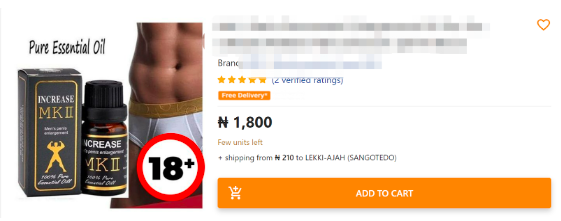
- All products with exposed private parts, sexually suggestive or adult-level images must be categorized under “Health & Beauty >> Sexual Wellness” related categories.
- If such images expose genitalia or private parts, stickers should be used in these areas with the indication “18+” (as shown in the example below).
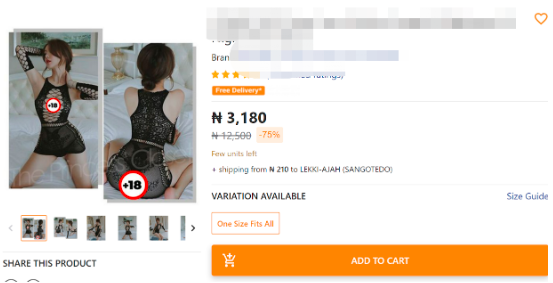
- Products in the category of erotic lingerie generally refer to sheer underwear that exposes private parts, usually with mesh and sheer designs (such as the following examples), and should use the following category: Health & Beauty >> Sexual Wellness >> Fetish Wear.
6. What to do if the product is not online
Check the Product Status Introduction to confirm the reason for being offline. If it is rejected by QC, update the product. If the status under Visible is Live but the product is not online on the front end, update the SKU status through the form to make it go online again.
7. How to check the store and online products on the front end after the product is launched?
7.1 Seller’s store front-end URL
For example, the Nigeria site: https://jumia.com.ng/store name (Note: The URL is only available if the store already has online SKUs)
7.2 Check online products on the front end
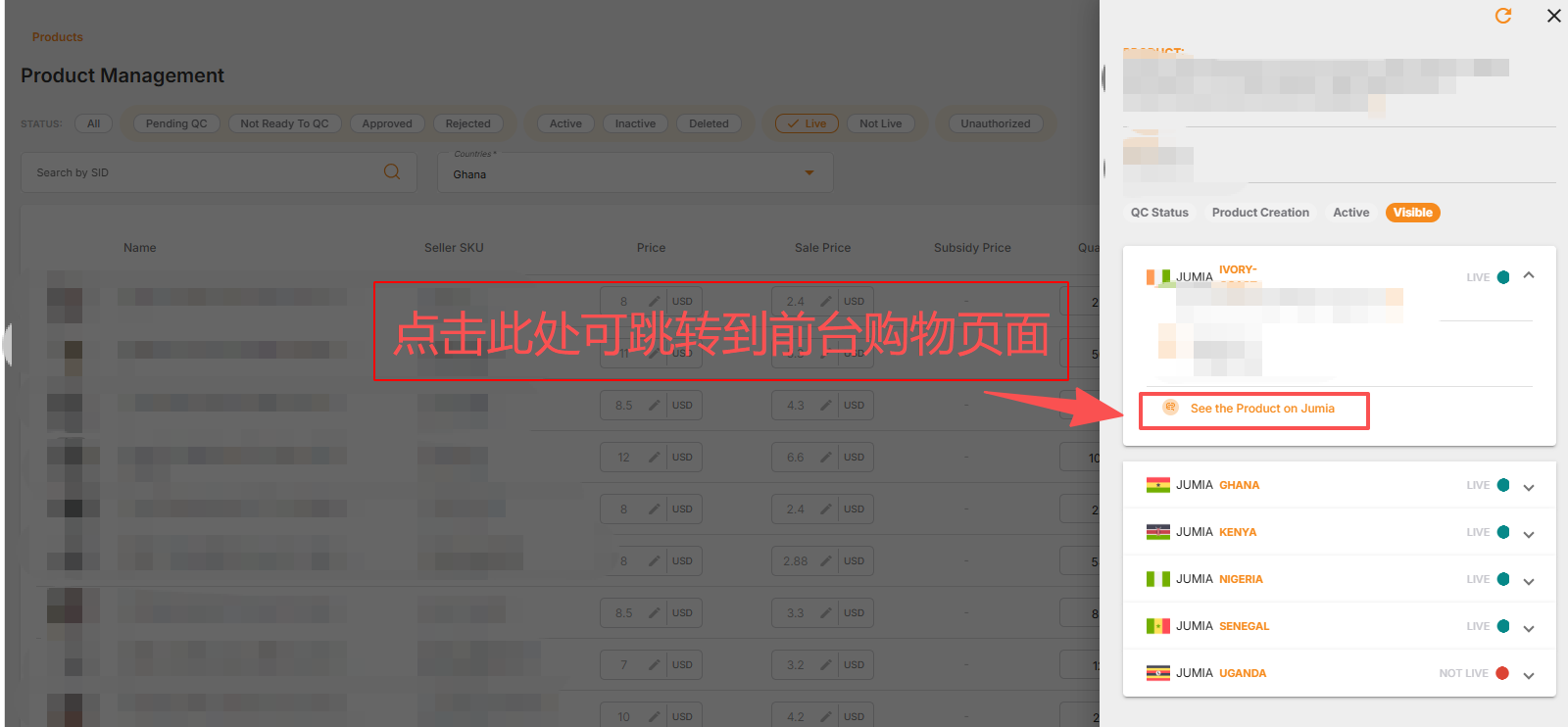
Method 1: View Visible and access the QC Live product. As shown in the image below, you can click the “See the Product on Jumia” button to go to the front-end product link.
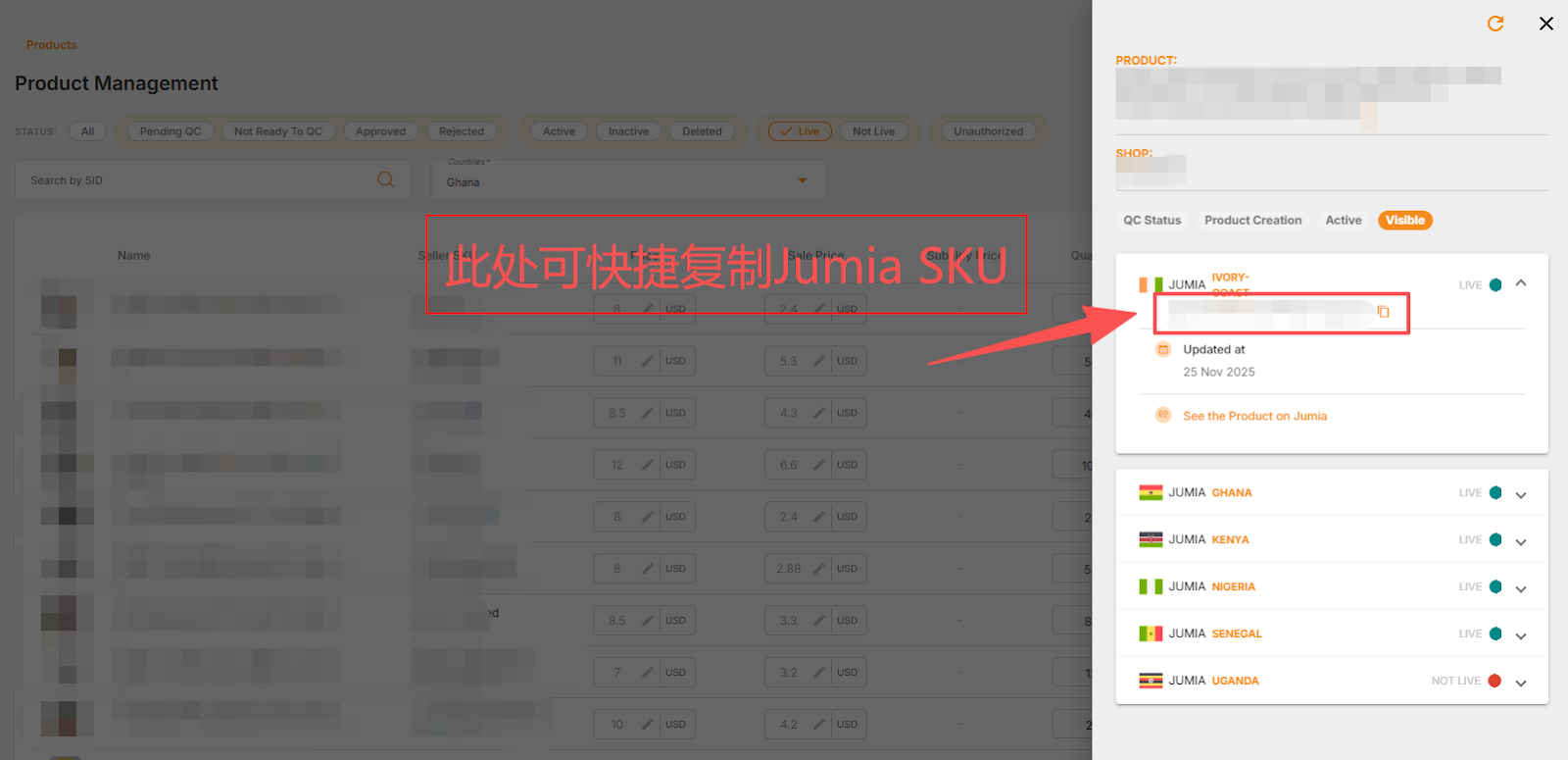
Method 2: Click “Active” to quickly obtain the Jumia SKU. Copy the corresponding site’s SKU to the corresponding site’s front-end search box to directly find the product’s online link.
8. Product images and content have been updated, but cannot be synchronized to the front end.
Please check the following first:
- QC Status: Has it passed QC review? If QC has not passed, please wait patiently for the QC review (usually 2 business days);
- Product Creation: Are there any prohibited words? Click on the product creation details to check if there are any prohibited words for each country. If so, please delete the prohibited words as prompted.
If the above issues are not resolved and synchronization still fails, please submit a customer complaint to RAC for assistance.
