
1. The Importance of Classification
- Enhance product exposure: Correct categories ensure that your products appear in relevant search results, increasing the chances of being discovered by potential customers.
- Optimize user experience: Accurate categories help customers quickly find the desired products, reduce browsing time, and improve purchase conversion rates.
- Ensure attribute matching: Selecting the correct category avoids missing important information for that category.
- Reduce review issues: Mismatch between categories and products may lead to review rejection or delayed listing.
- Improve advertising effectiveness: Precise categories make advertising more targeted, reduce the cost per click (CPC), and increase the return on investment (ROI).
2. Choosing the Best Category for Products
In the “Add Product” tool, selecting the most accurate category ensures that you see the most relevant attribute fields. Jumia requires sellers to select the most specific and complete category after the third-level category in the Vendor Center (VC).
You can refer to this category tree list to search for the complete category path suitable for your product (Note: Please read the “Seller Notes” to understand the relevant precautions before referring to the category tree list).
Special Note: Due to the internal category optimization process, do not create products under categories related to the “Electronics–Home Appliances” category level. If products have already been created under related categories, please modify the category as soon as possible.
3. Convenient Tools — AI Intelligent Recommendations
When entering a title on the product creation page, the system will automatically predict and display up to 5 suggested categories based on a data science model:
- Automatic Trigger: Suggested categories will automatically pop up as long as the entered title information is sufficient. A single click is all it takes to fill in the category, significantly improving creation efficiency.
- Automatic Filtering: The recommendation algorithm is deeply integrated with country/region activation status and category listing permissions. Only categories that you actually have permission for and that are legal and compliant will be displayed, reducing the risk of selecting the wrong category.
- Retain Your Right to Choose: Intelligent recommendations are only an auxiliary tool. You can switch back to manual category search mode at any time. If the system does not provide suggestions for specific reasons, the creation process will not be interfered with or blocked, and sellers have the right to choose the final category.
4. How to Use the Category Search Tool
1) Open category search when creating a product
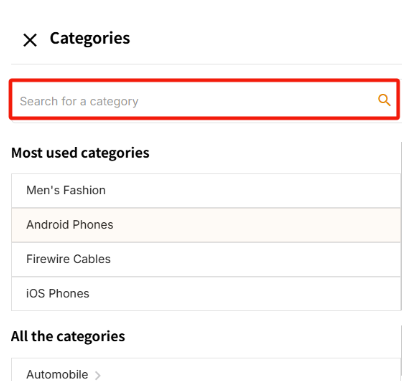
- Click the “Category” box in the VC to open the search tool.
Demo: Click the category box

- The VC category search tool pops up.
2) Enter product keywords
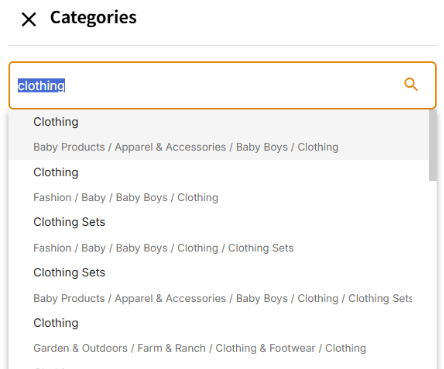
- Use basic keywords (such as “clothing”, “blender”) for fuzzy search.
- Example: Searching for “clothing”, the search tool will fuzzily retrieve related category paths (Note: These paths may be incomplete).
Demonstration: Fuzzy search
3) Select the correct category path
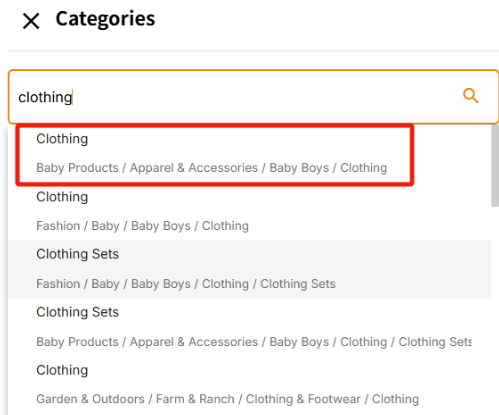
- Choose a more appropriate category from the search results for subsequent complete category details. (Note: The search tool will then exit and select the category you clicked by default)
Demo:
A. Select a more appropriate category
B. Then the search tool will exit, and the category you clicked will be selected in the editing interface

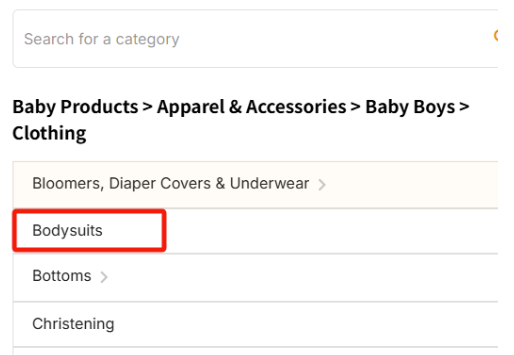
C. After selection, please click the arrow to the right of the category again to recheck the path to ensure its completeness.
- Incomplete path: A clickable arrow (>) appears, indicating that further selection of subcategories is required.
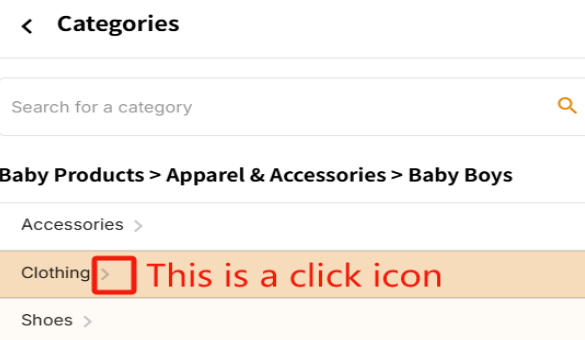
- Complete path: No arrow appears – indicating that the finest category has been selected.
4) Example: Create a blender product
Correct:
- Home & Office / Home & Kitchen / Kitchen & Dining / Small Appliances / Blenders / Countertop Blenders
- Home & Office / Home & Kitchen / Kitchen & Dining / Small Appliances / Blenders / Hand Blenders
- Home & Office / Home & Kitchen / Kitchen & Dining / Small Appliances / Blenders / Personal Size Blenders
Error (too general):
- Home & Office > Home & Kitchen> Kitchen Appliances
5) Confirm and submit
After selecting the correct category, continue filling in the product information.
5. How to modify the category
- Categories with different attributes cannot be changed. If prompted: “This category has different attributes, it cannot be used for this product.”

→ Solution: Delete the old SKU and create a new SKU with the correct category.
- Categories with the same attributes can be converted to each other. Please refer to the attribute set names in the category tree list categories belonging to the same attribute can be converted to each other. For example: Categories with the attribute name “Men & Women Clothes” can be converted to each other in the Vendor Center. Please note to select the complete category path when making your choice.
6. Important Notes
- Rejection risk: If the category is not specific enough, the product may be rejected for listing.
- An incorrect category path may affect product review and exposure. Please ensure to select the complete category path.
- Please be sure to select the category according to the actual product. Jumia will not support refunds or price difference compensation for any price differences caused by the discrepancy between the product category and the actual product (i.e., incorrect category placement).
- Due to system rule restrictions, attribute sets do not support modification for the time being.Please understand.
- Category paths cannot be deleted or added according to sellers’ needs.Please select the most appropriate complete category path within the existing range.
- Creating products with a complete category path is a basic rule of the platform. The system will be continuously upgraded according to the rules. Please complete your products in accordance with the rules to avoid operational inconveniences caused by system optimizations.
7. Category Reference Tips
- Use simple keywords (such as “smartphone”, “children’s shoes”, etc.) to search on the Jumia sales front-end for reference to suitable categories.
- Carefully browse subcategories in the VC category search tool and ensure to select the complete hierarchy of the product type when creating a product.
