
1. I can’t log in to my account. What should I do?
The login account is your registered email address. You need to reset your password upon first login.
Check if your login email and password are correct. If they are correct, but you still can’t log in, try the following methods. If these don’t work, please submit a customer service complaint (RAC) and provide an English video explaining your login problem:
- Clear your browser cache and cookies.
- Try using a different computer and Google Chrome.
- Try using a VPN.
2. Can I change my store name, registered email, and phone number?
After successful account registration, the store name and email address cannot be changed. If you want to use a new registered email address or phone number, you need to register again.
3. Why hasn’t my store been activated yet?
Sellers should ensure that the following conditions are met. If it is still inactive after meeting these conditions, please submit a customer service complaint.
- Sellers should ensure that the Shop / Business / Shipping information is complete.
- Sellers should ensure that their store has passed the review.
4. I didn’t receive an automatic reply email with the claim ID after raising a claim. What should I do?
Check if the email went to your spam/junk mail folder. If not, it generally won’t affect the platform’s processing of your complaint. If you haven’t received a reply within 3 business days, you can contact your Operations Manager or Incubation Manager for details.
5. Can’t receive the password change link?
Check if the password change email is in your spam folder. If you haven’t received the email, please contact your Operations Manager or Incubation Manager. If you don’t have a manager, please raise a claim and provide your login email address, a complete English video demonstrating the problem, and a detailed explanation of the situation.
6. What is the difference between delisting and closing a store?
♦ Closing a store means terminating your partnership with Jumia and ceasing all business activities on the Jumia platform. Once the store is closed, you will no longer be able to log in.
♦ Delisting a store means temporarily ceasing all business sales activities on the platform.
7. What is the process for closing a store?
If you decide to close your store, please first check if your store meets the following closure conditions.
1) Please check that all products in the store have been removed from the shelves.
2) All orders have a delivery completion time of more than 15 days.
3) The billing balance is 0 (no outstanding payments or receivables).
4) Jumia warehouse inventory is 0. If there is inventory, please retrieve it promptly, or confirm that Jumia has the right to handle the goods.
If these conditions are met, you can appeal your request through VC Raise a Claim, and we will close the store as requested.
8. Seller Store Information Change Request
8.1 Scope of Application
- Change of Store Registration Email
- Change of Store Name
8.2 Important Notes Before Applying
⚠️ Important note: This request must be submitted by a user with Shop Manager privileges in the store. Requests from users without Shop Manager privileges will not be accepted.
View Path: VC >> Settings >> Users >> Manage Users >> Click the “Shield” icon
More Help: Please click the Manage User to obtain complete information on User permission settings and management.
8.3 Required Documents List
1) Change of Registered Email
| Information | Description |
| Shop Name | Shop Name |
| Shop ID | Shop ID |
| Applicant | The user with Shop Manager privileges in the shop |
| Qualification Materials | 1. A scanned copy or photo of a valid business license. 2. A scanned copy or photo of both sides of the legal representative’s ID card |
| Reason for Application | The seller has completely lost access to the store’s email address, and the reason for this loss (currently only this reason is accepted) |
| Original Email Address | |
| New Email Address | Please ensure it is valid |
2) Change of Shop Name
| Information | Description |
| Old Shop Name | Old Shop Name |
| New Shop name | New Shop name |
| Shop ID | Shop ID |
| Applicant | The user with Shop Manager privileges in the shop |
| Qualification Materials | 1. A scanned copy or photo of a genuine and valid business license 2. A scanned copy or photo of both sides of the company’s legal representative’s ID card |
| Reason for Application | (Currently, only the following reasons are accepted:) “Store name lost during SC to VC migration” / “Existing name conflicts with brand name, affecting product launches” |
❌ Applications with insufficient reasons or containing invalid information such as “don’t know” will be rejected outright.
8.4 Application Path
Please submit your application via RAC (Raise a claim) with the following contact details:
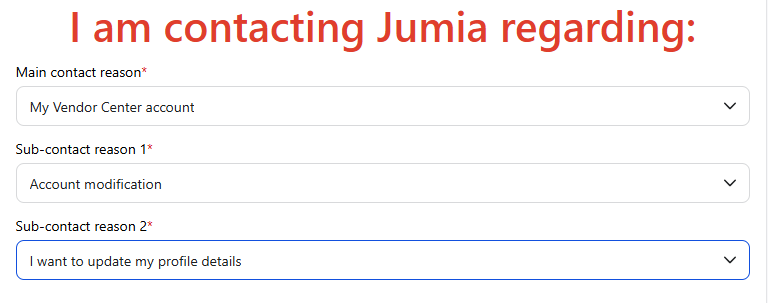
Please ensure that all necessary documents listed above are uploaded as attachments when submitting your RAC application to avoid processing delays due to incomplete information.
8.5 Frequently Asked Questions
Q: I don’t have Shop Manager privileges, can someone else apply on my behalf?
A: No, applications from individuals other than Shop Managers will not be processed.
Q: How long does the change process take?
A: It usually takes 7 business days to process, depending on the type of application.
If you have any questions, please contact the Seller Support team via RAC.
