
Dear sellers,
Jumia requires that the overseas warehouse accounts of sellers are updated with corresponding inventory by Jumia agents based on the products put into the warehouse. The specific process is as follows:
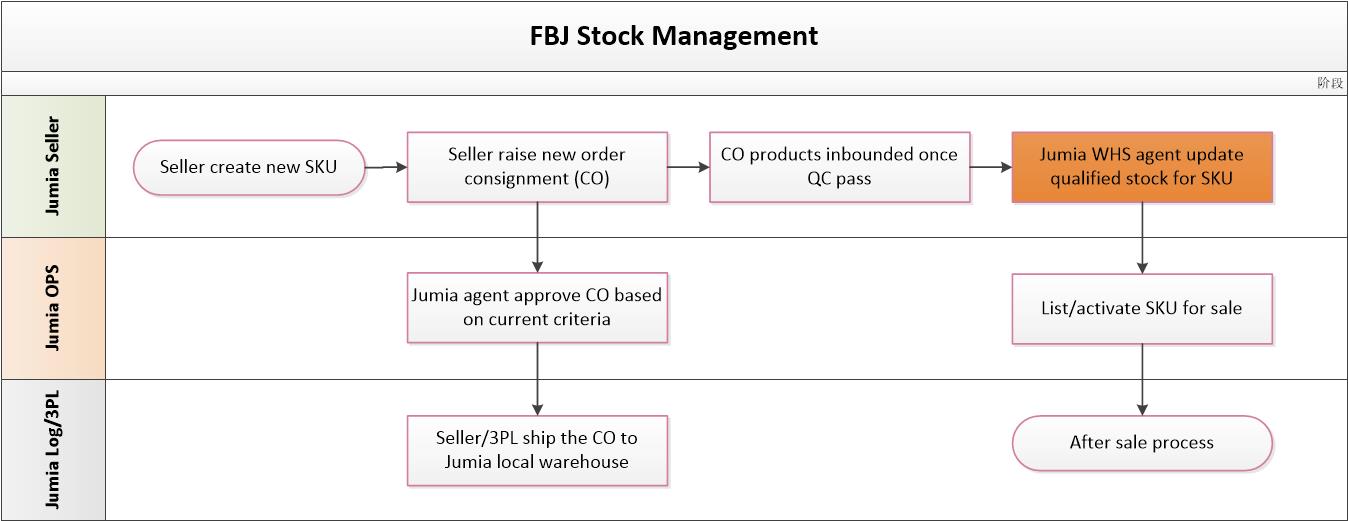
- Sellers are not allowed to change the inventory of FBJ products without authorization.
- Jumia will delist accounts with bad Seller Score (for details, please refer to “Overall Introduction to Platform Policy“).
- When the store score is lower than 3, the store will be charged corresponding operating expenses according to the store score range. (Click here to learn more details)
How to conduct inventory checks for overseas warehouses?
Since the overseas warehouse accounts continuously process orders, the platform does not provide real-time dynamic inventory of products. We recommend that you perform quantity checks during the following steps:
- Warehousing process: After the Jumia local warehouse receives the goods, it will provide a receipt (POD). Please confirm the quantity shipped and the quantity received. If there is a discrepancy, you need to submit a receipt (RAC) within 30 days from the date of receipt. Otherwise, we will not accept the claim.
- Warehouse Return (RTV) Process: When returning products to the warehouse, please check the product quantity, contents, and other information. If there are any problems, please report them on-site and file an appeal (RAC) within 2 business days after picking up the goods. For appeal guidelines, please refer to here.
