
I. Reasons for Return/Abandonment
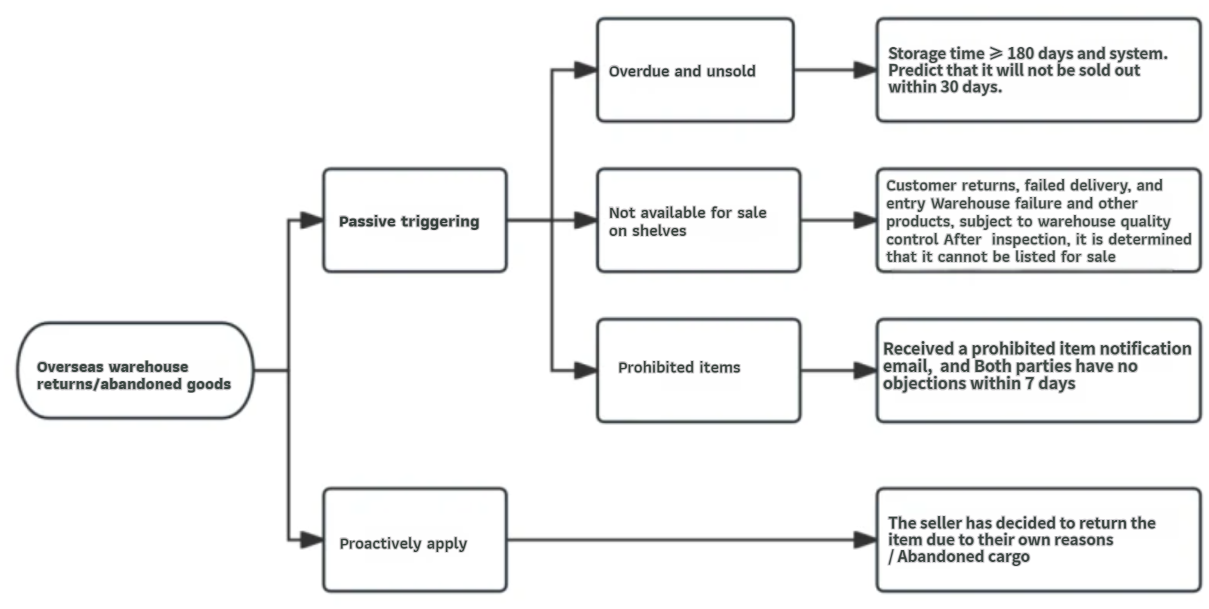
1) Passive Trigger
- Expired and Unsold: The product is in normal sales status, has been in storage for ≥180 days, and based on sales performance over the past four weeks, the system predicts it will not sell out within 30 days.
- Unsellable:
- Products returned by customers, failed delivery, or under other special circumstances are returned to the warehouse. After quality inspection, the warehouse determines the product cannot be sold.
- If, during or after delivery to the warehouse, further quality inspection reveals abnormalities that prevent continued sales, the warehouse will arrange for the product to be returned.
- Prohibited Products: Prohibited products are removed from the platform. If the seller receives a notification email and has no objection within 7 days, the prohibited product will be returned.
2) Seller-Initiated Return/Abandonment: The seller decides to return or abandon the product due to their own reasons. Currently, only all normally online-selling inventory under SKU Simple (variation) can be returned/abandoned.
Note: If other circumstances require return to the warehouse, the platform will notify you separately via email.
II. Return/Abandonment Process
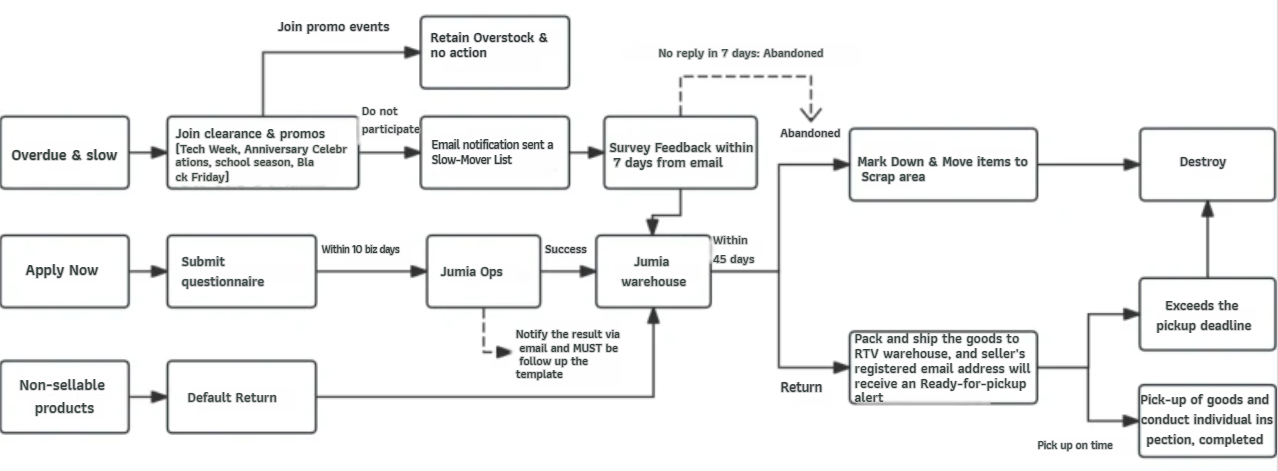
1) Overdue Unsold Goods
- After the monthly clearance sale or platform promotional event, a list of overdue unsold goods will be sent to the seller’s registered email address. Click to view an email sample. If processing of overdue unsold goods is discontinued, an announcement will be made via email or Seller University.
- After receiving the email in your registered email address, click the link in the email, fill out the questionnaire as instructed, and submit it.
Note: Sellers must complete the questionnaire before the deadline specified in the email; otherwise, it will be treated as abandoned goods.
2) Unsellable Goods
- For goods returned by customers or those that failed to be delivered, the Jumia warehouse will conduct quality inspections. Once it is confirmed that the goods cannot be relisted for sale (no seller confirmation required), unsellable goods will be sorted and packaged daily and sent to the returns warehouse. Sellers can pick up their goods from the warehouse according to the pickup email sent by the system.
- Items with inbound anomalies: Jumia’s inbound team will mark the item as unsellable upon discovery and initiate a return process. Sellers will then pick up the item from the warehouse according to the pickup email sent by the system.
3) Prohibited Items
- After receiving notification of prohibited items being removed from the shelves, sellers must file an appeal (RAC) within 7 days if they have any objections. Failure to appeal in time will result in the prohibited item entering the return process.
4) Seller-initiated returns/abandonments
- Sellers can scan the following QR code using WeChat or click this link to access the questionnaire. Complete the questionnaire as instructed and submit it. The results will be sent via email within 10 business days.
III. Pickup Process
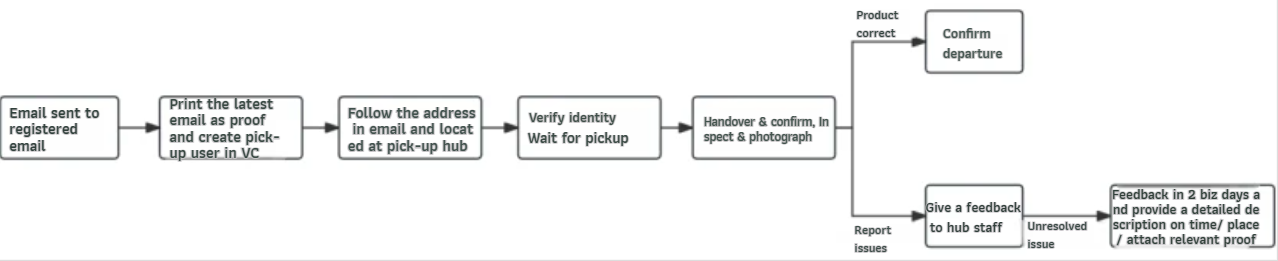
1) Register an email address. After receiving the pickup email, sellers should print the latest date of the pickup email, which should include necessary product information such as date, store name, RS number (return tracking number), SKU, etc., for on-site verification. Please click to view a pickup email example.
2) Before picking up the goods, the seller needs to create a UserName and Password in the Vendor Center for warehouse identity verification. Please click to view the instructions for creating a pickup person.
3) The seller should go to the correct pickup location according to the email address provided.
- Note: Some countries have multiple return warehouses; please pay attention to the email address when picking up the goods. In Kenya, an original or copy of the pickup person’s ID card (passport) is required for identity verification only.
4) Warehouse staff will guide the seller to the handover location. The seller will enter their UserName and Password into the computer provided by Jumia for verification. The warehouse staff will then hand over the package to the seller. A document detailing the contents of the package is attached to the outside of the package, including SKU, RS number, etc. Please click to view the details document.
5) The seller and warehouse staff must be present simultaneously to verify the quantity and contents of the goods:
- Whether the seller’s RS number information matches the document on the outside of the package.
- Whether the document on the outside of the package matches the actual goods inside the package.
6) If there are any issues with the goods, the seller must explain the problem to the warehouse staff on the spot, making sure to record the scene and take photos as evidence. If you need to report the problem, please file a complaint (RAC) within 2 working days of picking up the goods, applications submitted after the deadline will not be accepted.
7) The seller clicks the “Confirm” button on the computer to confirm and leaves the warehouse with the goods.
8) The system will automatically send a pickup completion email to the seller’s registered email address. Please click to view a sample pickup completion email.
9) Note: Pay attention to the remaining days on the pickup email. After the remaining days reach 0, the goods will be destroyed and cannot be picked up.
IV. Frequently Asked Questions about Returns/Abandonments
| Common Issues | Resolution / Processing Notes |
| Return / Forfeit Timeline |
|
| Progress After Voluntarily Submitting a Return / Forfeit Request |
|
| Return Reason or Order Number Corresponding to an RS |
|
| Pickup Notification Email Not Received |
|
| Issues with Pickup Quantity: 1) Upon arrival at the return warehouse, the warehouse did not hand over goods, or only partially handed them over 2) Incorrect quantity inside the package |
1) The picker must report the quantity discrepancy to warehouse staff on the spot and have them record the issue. 2) A photo of the warehouse entrance. 3) Photos taken at the scene.If you need to report an issue, an appeal (RAC) must be submitted within 2 business days after pickup; late submissions will not be accepted. The following information must be provided in the RAC:
|
| Issues with Pickup Quality: 1) Goods damaged or accessories missing 2) Incorrect items inside the package |
1) The person picking up the goods shall report any problems to the warehouse staff on the spot, and the staff shall record the problems. 2) A photo of the warehouse entrance. 3) Photos taken at the scene. 4) Photos of damaged items taken inside the warehouse — at least one photo per item. If you need to report an issue, an appeal (RAC) must be submitted within 2 business days after pickup; late submissions will not be accepted.
|
| Failure to Pick Up Within the Remaining Pickup Window |
|
| Orders Still Being Placed After a Return / Forfeit Request Is Submitted |
|
| VC Shows Item Status as ‘Return Shipped’ but No Email Received |
|
