1. Creation of Consignment Order
1.1 Summary of Shipping Process
- Apply for CO (Consignment Order): Create a CO (apply for a consignment order) in the Vendor Center
- Prepare documents:After the CO is approved, prepare the documents required for shipping as specified by the platform
- Obtain SO (shipping number): Need to contact the logistics provider to obtain it. If delivering from the local area, it can be left blank if there is no SO number. This item is not mandatory.
- Pack the goods: Pack as required and affix the Jumia SKU barcode and outer box label
- Update status:Ship to the logistics warehouse and update the shipping status on the Vendor Center – CO details page
- Make an appointment for warehouse delivery: Send a pre-notification email to the Jumia overseas warehouse / some logistics providers cooperating with the platform will help sellers complete this step, which can be confirmed by communicating with the logistics provider in advance.
- Wait for listing: After delivering to the warehouse according to the appointment time, patiently wait for the goods to be listed and put on sale.
1.1.1 Review Rules for Consignment Order (CO)
| Invoice creation level | Consignment order Create audit standards |
| Seller level conditions | Quality return rate =< 3% OR Total number of Items returned for quality < 5 |
| SKU level conditions | Quality return rate =< 3% OR Total number of Items returned for quality < 5 |
| Calculation cycle: The number of returned products among the successfully delivered products in the past 30 days. | |
| Inclusion criteria: Returns confirmed by the after-sales team as being caused by quality reasons (returns for other reasons and those confirmed by the after-sales team as not caused by quality reasons are not included). | |
| The above conditions must be met simultaneously. |
Notes:
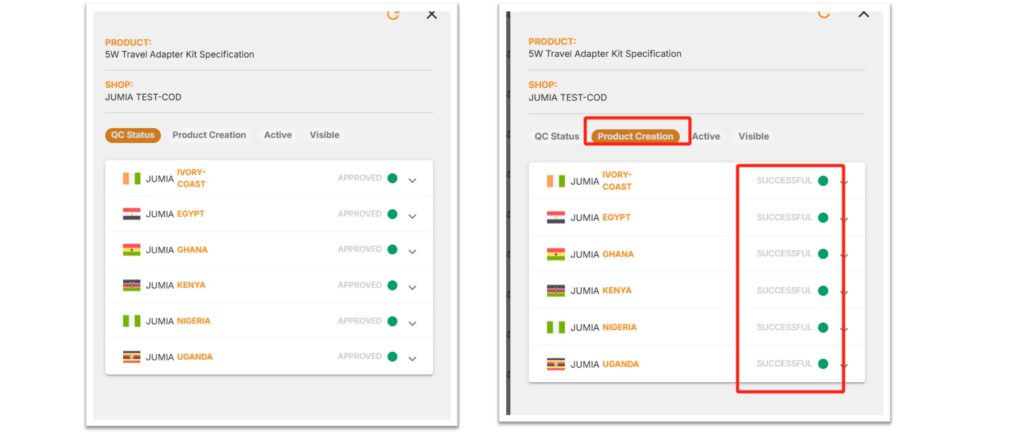
For FBJ stocking, you need to first list the products in the Vendor Center backend. Only after the products have passed QC APPROVED can you apply for CO and send the stock to FBJ.
- CO (Consignment Order) is one of the important pieces of information that must be verified when goods are stored in Jumia’s overseas warehouse. Sellers must ship the goods only after the CO application has been approved to avoid rejection of storage due to the absence of a CO number.
- SO (Shipping Order) number, i.e., the logistics storage number, needs to be obtained by the seller by contacting the logistics provider on their own.
Jumia cannot act as the importer/consignee of the bill of lading/notify party. In case of such a situation, Jumia’s overseas warehouse has the right to refuse to receive the goods. After the products are stored in the warehouse and put on the shelves, storage fees will be charged according to the product categories.
♦ According to the platform policy, for new mobile phones and refurbished mobile phone products, sellers can only create corresponding SKUs and apply for CO if they and their products meet the platform’s qualification requirements and have received official email approval from the platform. Jumia reserves the right to remove any SKUs of unauthorized sellers at any time.
2. Detailed explanation of the overseas warehouse shipping process
2.1 Tutorial on applying for a shipping order
Notes:
- All products in the downloaded files meet the application standards.
- The number of SKUs in a single CO must not exceed 100,and the total shipment quantity of all SKUs in a single CO must not exceed 5,000 pieces. Exceeding these limits will result in failure to pass the review or rejection by the warehouse.
- When shipping, please ensure that the actual shipped products are consistent with those in the CO (including quantity, color, size, brand, etc.). Otherwise, the goods will not pass QC and be put on the shelf after arriving at the warehouse.
For details, please refer to the FAQ for Inbounding process
2.2 Stock Preparation and Document Preparation
2.2.1 Regarding Packaging of Goods
1) Notes:
- Products that do not belong to the same CO must not be packed in the same box.
- A single CO can include multiple boxes; please affix the outer box labels as required.
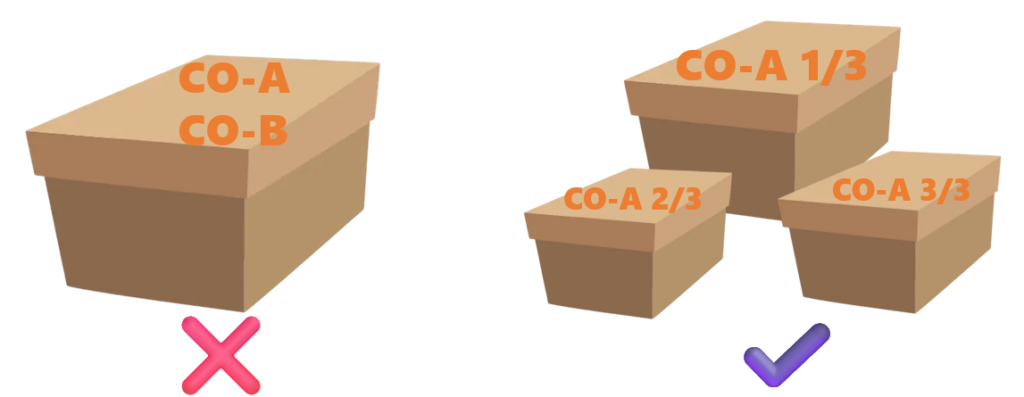
- The same CO is prohibited from partial shipments or partial appointments for warehouse delivery; otherwise, there is a risk of being rejected by the warehouse.
- Avoid mixing different SKUs in the same box. If products are small and must be mixed in the same box, please make sure to pack products of the same SKU separately first, and label the corresponding jumia SKU and quantity on the packing materials (such as bags, small boxes, etc.) before packing.
- For reference on the selection of cargo packing materials: https://www.kdocs.cn/l/cpD5y5USh4zC
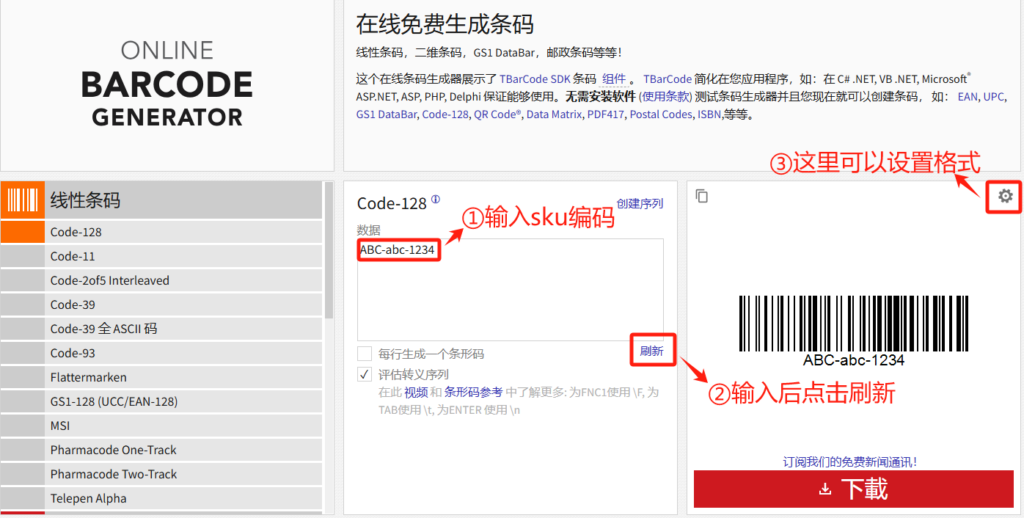
- Each piece of each SKU product needs to be affixed with a clear Jumia SKU (Shop SKU) barcode.
For example, if one CO has 1 box of products, and the box contains 2 SKUs, with 50 pieces for each SKU, then the seller needs to affix Jumia SKU barcodes to 100 products. Click here
2.2.2 Examples of Common Problems
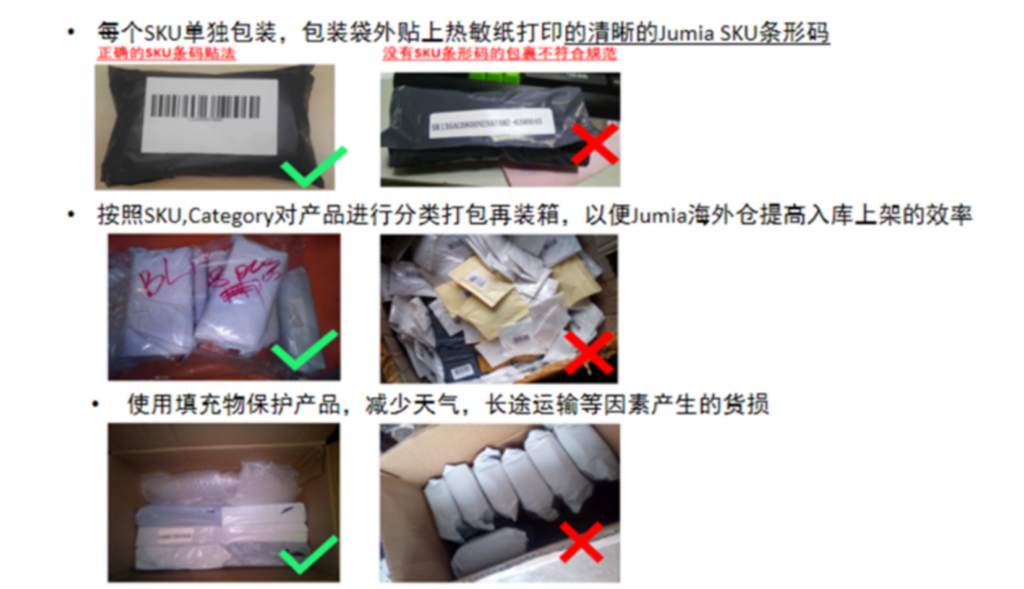
2.2.3 Outer Carton Packing
- Use sturdy outer cartons to prevent goods from being damaged. For recommendations and illustrations of inner and outer packaging, please click: https://kdocs.cn/l/cqsiKHEtTsLG
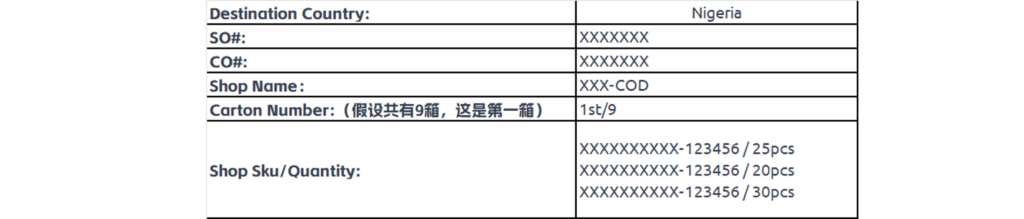
- Attach the outer carton label(FBJ Carton Labelproperly and prevent goods from being mixed up, which may cause discrepancies in goods.

Click [here] to download the Carton Label. If the logistics provider offers a template that includes the following key information, you can also use the logistics provider’s template.
2.3 Apply for a logistics warehouse entry number SO (Shipping Order)
In this process, the seller needs to contact the logistics service provider to obtain the SO (Shipping Order) number, which is the logistics warehouse entry number. If it is impossible to provide the SO, it can be left blank.
2.4 Prepare the packing list document
FBJ Packing List: Click [here] to download the blank template. An example of a correctly filled template is shown in the figure below:
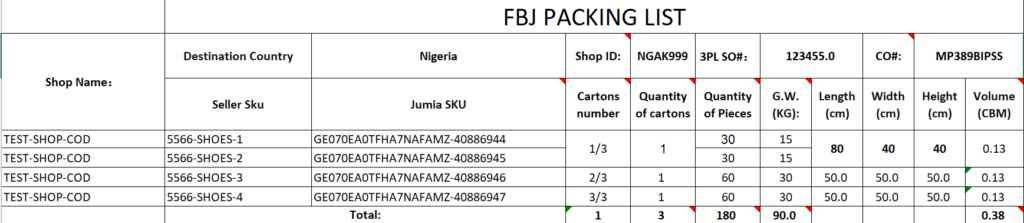
Special case: If the logistics provider used by the seller provides a Packing List template that has a different format from the one in the table above but contains all the key contents, it can also be used.
2.4.1 The seller needs to print the FBJ Packing List and place it in the 1/X box (i.e., the first box in the same CO) to facilitate the local warehouse’s storage.
2.4.2 If a non-officially recommended logistics service is used, be sure to remind the delivery personnel to bring an additional two copies of the FBJ Packing List (printed on A4 paper) to the warehouse when delivering the goods, and check the quantity signed and received by the warehouse on site; if an officially recommended logistics provider is used, it is only necessary to send the FBJ Packing List to the logistics provider, and they will arrange for appointment and delivery to the warehouse and other matters.
2.5 Deliver to the logistics provider’s consolidation warehouse and update the logistics status to Vendor Center
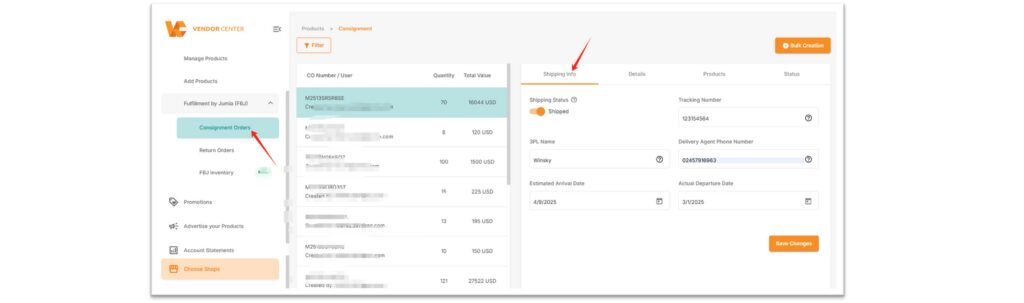
- Shipping Status: Change to “Shipped”
- Tracking Number: Fill in the logistics SO number. If delivering by yourself and there is no tracking number, fill in the CO number.
- 3PL Name: The name of the logistics provider used by the seller
- Delivery Agent Phone Number: Contact phone number of the local delivery person
- Estimated Arrival Date: The estimated date when the goods will arrive at the overseas warehouse. For COs that are about to arrive at the port, sellers need to upload this date information in the seller center based on the actual logistics and transportation situation. This can effectively help JUMIA warehouses predict warehouse capacity and improve the efficiency of CO warehousing.
- Actual Departure Date: The actual departure time of the goods from the port
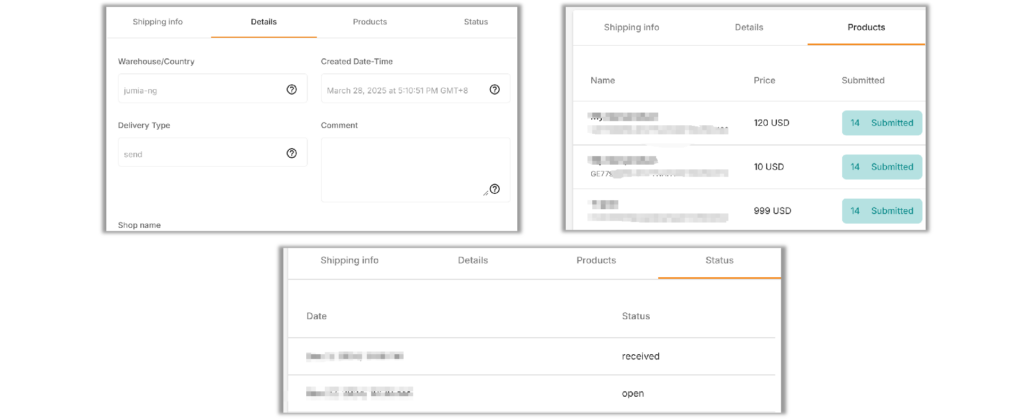
♦ Content of each page in the CO details page:
- Details: The country for which the CO is applied, and the creation time of the CO.
- Products: Including the name of each SKU in the CO, JumiaSKU, price, and the applied quantity.
- Status: Records of CO status updates.
2.6 Booking for warehouse delivery
- Before delivering to the warehouse, please make sure to book a warehouse space in advance via email or the system. You can only deliver on time after the booking is successful or you receive the confirmed time from the warehouse.
- If you use the officially recommended logistics, please confirm with the logistics provider that they will make the reservation on your behalf and deliver to the warehouse on time; if you use non-officially recommended logistics or need to deliver to the warehouse by yourself locally in Africa, please make the reservation yourself before arranging the delivery.
- Please make an appointment in advance according to the quantity of products (at least 3 working days in advance). For details, please refer to the following:

- The reservation methods corresponding to each country are as follows in the table
| country | Reservation method | Remarks | |
| Nigeria | Email or system | [email protected] OR [email protected] | |
| Côte d’Ivoire | [email protected] | ||
| Kenya | Email or system | [email protected] | |
| Ghana | [email protected] | After the system reservation is successful, you still need to send the Packing List attachment to the warehouse via email. | |
| Uganda | Email or system | [email protected] | |
| Senegal | [email protected] | ||
| Egypt | Email or system | [email protected] |
- For system reservation guidelines, please click **[here]**.
Email reservation template (click the link on WeChat mobile):
https://doc.weixin.qq.com/doc/w3_AdMARAYoAFsjV5G16I5TjCYAk3er6?dver=
The email must be accompanied by the packing list FBJ Packing List (as shown in the figure below; the packing list should be added to the email as an attachment, not as an image).

- Sellers must provide packing lists with accurate information to avoid affecting the receipt verification and warehousing process at the Jumia warehouse.
- Friendly reminder: If using logistics not recommended by the official, be sure to remind the delivery personnel to bring two copiesof the FBJ Packing List (printed on A4 paper) to the warehouse when delivering the goods, and check the quantity signed by the warehouse on site.
- The number of items to be listed is based on the actual quantity received by FBJ. If there is any discrepancy, please contact the logistics provider.
- If it is found that the goods do not match the description or the products are suspected of infringement or being fake and shoddy during listing, it will affect the normal warehousing of the products or result in warehousing failure.
2.7 Goods delivered to the warehouse, waiting for listing
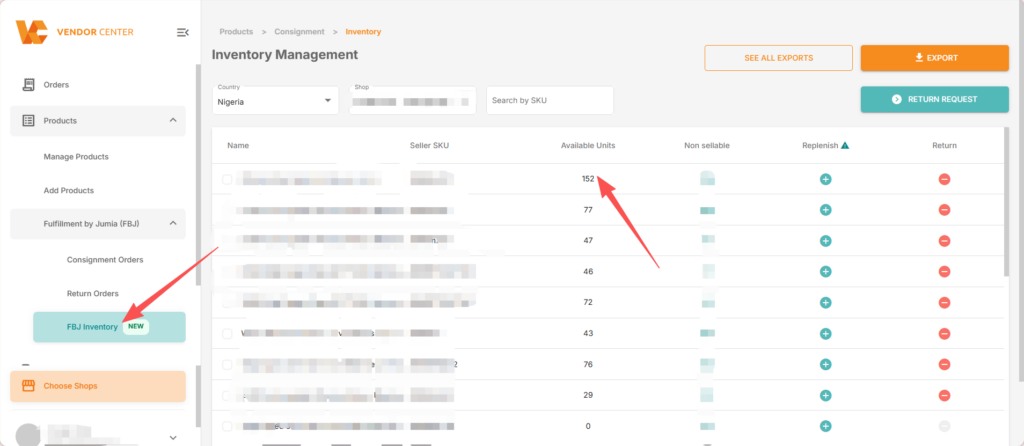
After the goods are delivered to the warehouse, it will take about 2 working days to complete the listing. You can check the actual inventory quantity in the warehouse on the page as shown in the figure below in the background. Here are the warehouse addresses in different countries for your reference.