1. How do I receive payment after a successful order transaction?
Jumia currently supports USD or local currency payments. For more information on payment methods, please refer to this link.
2. My Payoneer card is linked to a corporate account. Can I transfer the money to my own account?
For specific operational details, please consult the Payoneer team.
3. How is the payment cycle set?
- USD Payments: Each calendar month is divided into two cycles. The first half of the billing cycle runs from the 1st to the 14th, and the second half runs from the 15th to the 30th (31st). The billing cycle is open until the end of the cycle; it is closed after the cycle ends.
- Local Currency Payments: Based on each calendar month, the billing cycle is 5 business days after the billing cycle closes.
4. What should I do if I haven’t received payment from Jumia by the payment date?
Please confirm that you have successfully linked your payment account (showing “Approved”), that your account has a positive outstanding balance, that your Payoneer account is active (if your payment account is Payoneer), that your onboarding approval has been passed (showing “Verified” on the Business Information page), and that you have confirmed with your local currency payment provider that you have not received payment for this bill.
If all of the above conditions are met, please raise a claim to request processing. When raising a claim, you will need to provide the store name, billing cycle number, and screenshots of your communication with your local currency payment provider to prove that you have not received payment for this bill (if it is a local currency payment).
5. For USD payments, if the exchange rate changes during the billing cycle, which exchange rate will be used for the payment?
For example, the exchange rate for Nigeria in December 2022 was 880 NGN, and the exchange rate in January 2023 was 800 NGN. The exchange rates for payments due around December are as follows:
- December 1, 2022 to December 15, 2022: Payment due date is December 21, 2022, exchange rate is 880 NGN.
- December 15, 2022 to December 31, 2022: Payment due date is January 6, 2023, exchange rate is 880 NGN.
Note: In case of special circumstances (Paycheck not linked, Paycheck account abnormality, etc., normal payment conditions not met) that prevent payment from being completed within the agreed period (the fifth business day after the end of each billing cycle), the delayed payment will use the current exchange rate.
6. How to download statements in VC?
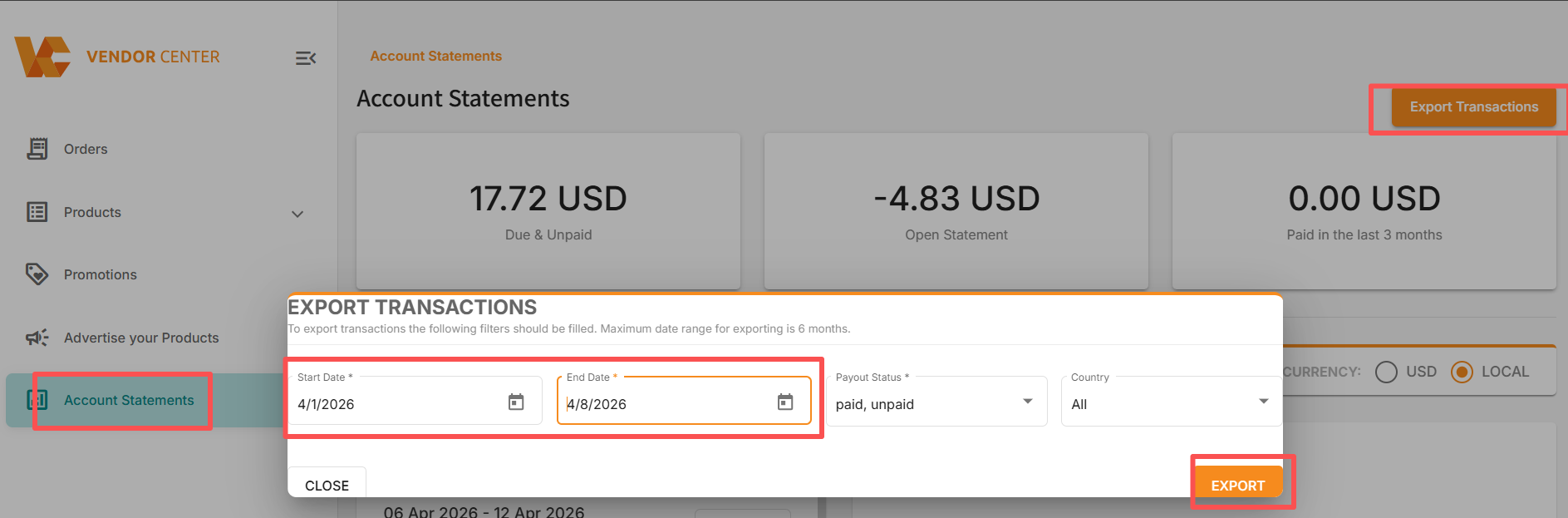
Statement download path: VC >> Account statements >> Export Transactions >> Choose date range, payout status >> Export