
1. In the advertising backend, when adding products to a promotion plan, the SKU cannot be found.
This is usually caused by the following reasons:
- The product status has not been synchronized to the advertising backend – please wait patiently; synchronization is generally completed within 2 working days.
- The product information has been updated/edited within the last 48 hours – please wait patiently for 2-3 working days.
- The product is not online – search for the product on the Jumia shopping page, and it needs to be normally online.
- Product inventory must be less than 3 units – inventory must be greater than or equal to 3 units to enable the launch.
- The inventory is the latest update, but the status has not been synchronized to the advertising backend – please wait patiently for 2-3 working days.
- Check if the product’s category setting belongs to a restricted category, such as “Health & Beauty > Sexual Wellness”. For details, please refer to the prohibited category list.
2. Where will the products promoted by advertisements (if they successfully win the advertising space and are exposed to consumer users) be displayed?
- The first row of the search results page (products have the “Sponsored” logo).
- The first row of the category search page (products have the “Sponsored” logo).
- Product details page (Sponsored Products section, note: it will be displayed before the detailed description on mobile devices).
- Homepage recommendations (Sponsored Products section).
3. When viewing advertising data, the overall exposure on the campaign data dashboard is not equal to the sum of the exposures of each keyword in the keyword report.
There are various display positions for advertising products, not just search display positions. The main differences of the data dashboard are as follows:
- Data sources of the data dashboard: homepage + category page + search page + product details page.
- Data sources of the keyword report: search page.
The exposure, clicks, conversions and other data displayed on the data dashboard refer to the sum of all display positions, including search results pages, category search pages, product details page recommendations, homepage recommendations, etc. However, the data in the keyword report of the advertising backend is mainly related to user search behaviors, and the system does not include data from other display positions, so it is normal for the data volumes to be different.
4. How to decide whether to use manual advertising or automatic advertising?
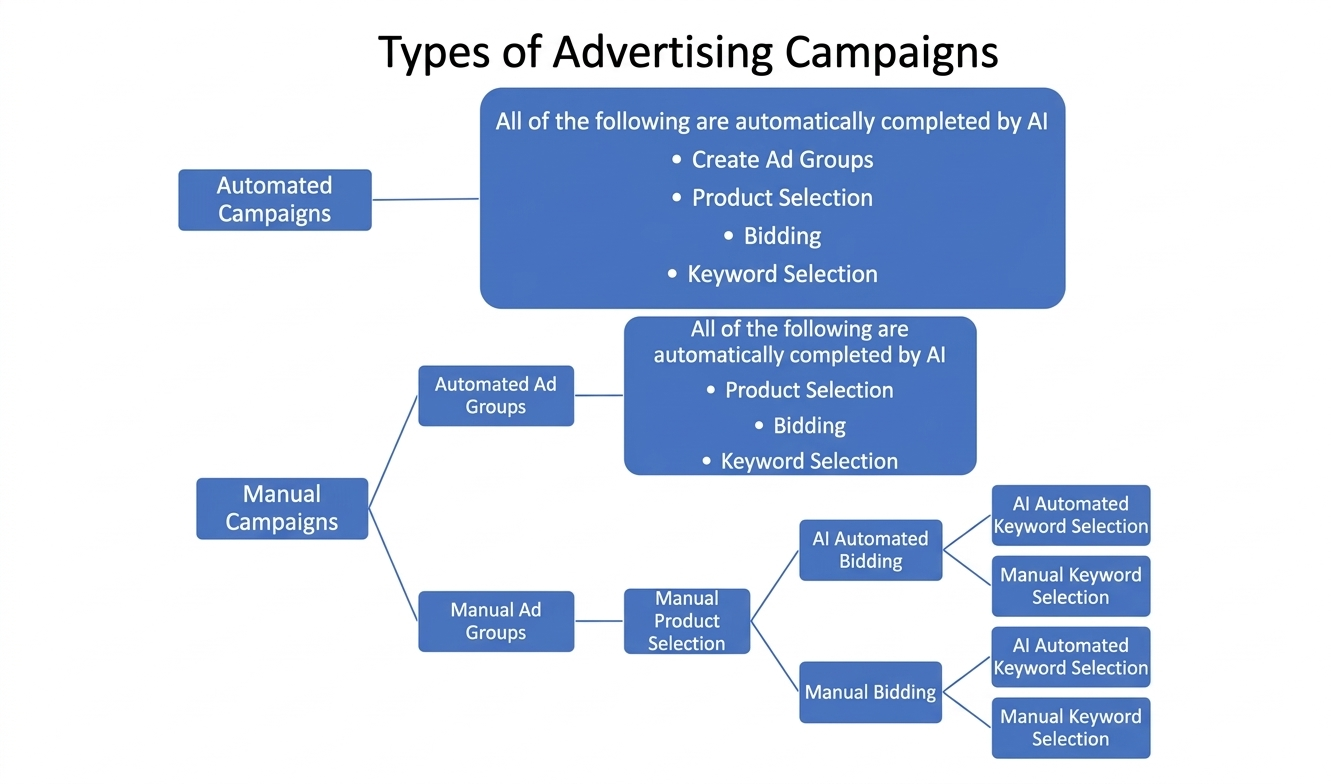
Manual advertising and automatic advertising each have their own advantages and disadvantages. Generally speaking, automatic advertising is more worry-free. The system will automatically match relevant keywords and products, which is suitable for new sellers or sellers who want to quickly increase exposure. Manual advertising allows you to set bids and keywords by yourself, and the placement is more accurate, but it takes more time to adjust and optimize, and is more suitable for experienced sellers who want to operate meticulously. We recommend that sellers start with automatic advertising to allow the system to accumulate data and understand product performance, then gradually increase manual advertising based on the results to achieve higher conversion effects.
Note: Currently, it is not recommended to run manual advertising and automatic advertising at the same time, because the products selected by AI in automatic advertising may already include those selected in manual advertising, leading to internal competition in the store and a phenomenon of traffic snatching.
5. If you have any other questions, suggestions, or needs, please feedback to us through the following link:
