
Vendor Center API
- Vendor Center (VC) is a brand-new seller center launched by Jumia.
- You can use this system to manage the products, orders, and bills of shops in different countries in one go.
- The VC API allows sellers to integrate their ERP systems into our API interface so that they can easily manage and operate their shops.
- The developer of the seller’s own system or the developer of a third-party system can integrate the API interface according to the guidance on this page. At present, VC API includes the following two functional interfaces.
1. API docs:
https://vendorcenter.jumia.com/api-docs/
2. Create and manage the application
Before integrating the Vendor Center API, log in to the Vendor Center and perform the following operations to create an application.
2.1 Refer to the API documentation for the details about key generation and application authorization.
The default API access permission is set as Master shop level.
2.2 Create Application
- Click“Settings”
- Click “Applications”
- Click “Create Application”
- Fill in the application name
- Select verification type (You must fill in the Redirect URL if you select a Web Application type)
- Click “Create”.
- You can then generate the Client ID and share it with the ERP agent
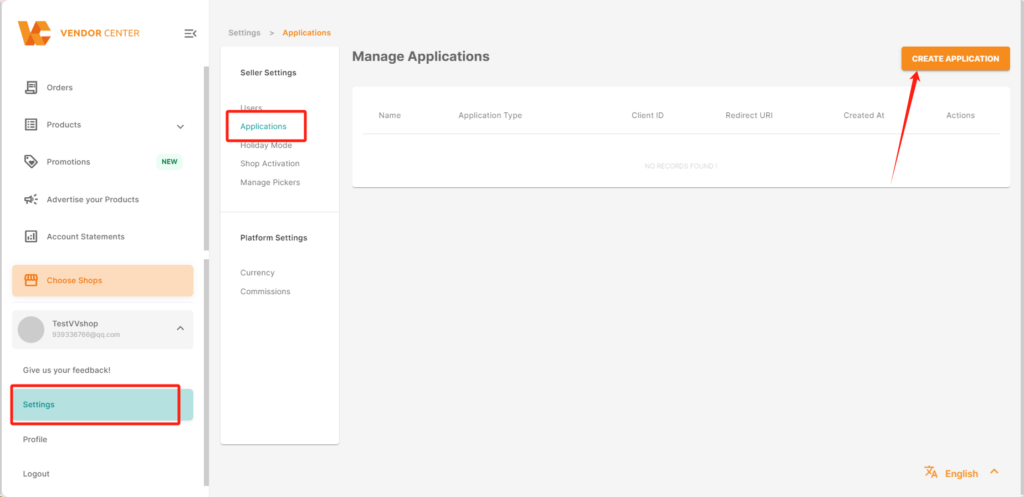
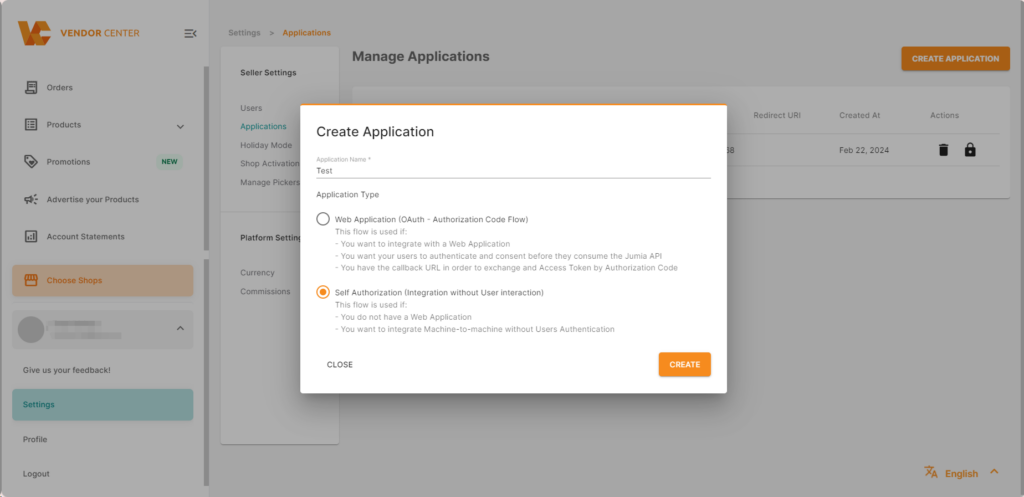
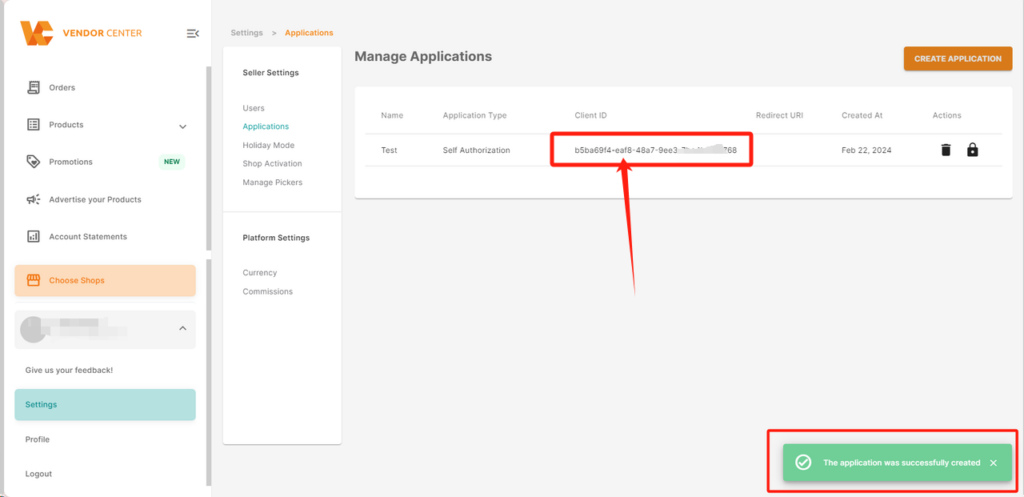
A Client ID is assigned by the authorization server when a client application is registered. It is used to establish secure communication between the client application and the authorization server, ensuring that requests come from a known, authenticated source.
2.3 Manage the application
Remove Application and Generate Token:
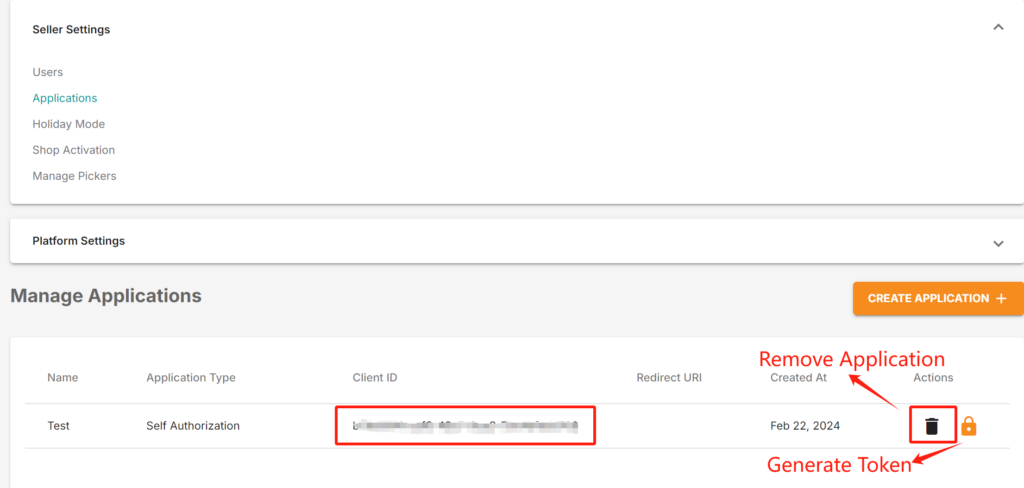
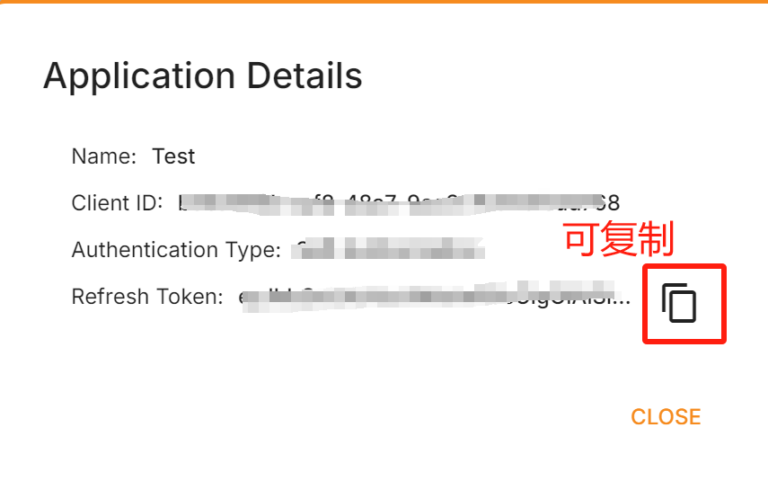
Client ID is assigned by the authorization server when registering a client application. It is used to establish secure communication between the client application and the authorization server, ensuring that requests come from a known and authenticated source.
3. Details of ERP support are as follows
| ERP (Enterprise Resource Planning) | Product Listing | Order Management |
| Mango Store Master (芒果店长) | ✓ | ✓ |
| Miaoshou (妙手) | ✓ | ✓ |
| Wangxiaowang (旺销王) | ✓ | ✓ |
| Mabang (马帮) | ✗ | ✓ |
| Xiao Laoban (小老板) | ✓ | ✓ |
| Yijingpai (易境派) | ✓ | ✓ |
4. Key functions of the GOP
Global Order Processing (GOP)
- Obtain and handle orders from multiple countries and sub-shops
- Package and deliver
- Obtain the delivery shipping label and logistics tracking number
| Function | Explanation |
| Authorize authentication | Create application Authorize application |
| Get shops | Get Shops – “/shops”Get Shops of MasterShop – “/shops-of-master-shop” |
| Get orders | Get All Orders – “/orders”Get Order Items – “/orders/items” |
| Order processing operation | Shipment Providers – “/orders/shipment-providers”Create Package – “v2/orders/pack”Mark as Ready to Ship – “/orders/ready-to-ship”Print Labels – “/orders/print-labels”Cancel Orders – “/orders/cancel” |
5. Key functions of GPM
Global Product Management (GPM)
- Get the basic listing structure
- Obtain products, create and update SKU content
- Update price, inventory, and SKU status
- Consignment management (applicable to FBJ shops only)
- Create Consignment Order (CO)
- Acquire inventory of FBJ warehouse
- Update logistics tracking information
| Function | Explanation |
| Authorize authentication | Create application Authorize application |
| Get shops | Get Shops-“/shops”Get Shops of MasterShop – “/shops-of-master-shop” |
| Get the basic listing structure | Get Brands – “/catalog/brands”Get Categories – “/catalog/categories”Get Attributes – “/catalog/attribute-sets/{id}” |
| Obtain products, create and update SKU content | Get Products – “/catalog/products”Products Create Feed – “/feeds/products/create”Products Update Feed – “/feeds/products/update” |
| Update price, inventory, and SKU status | Products Update Stock Feed – “/feeds/products/stock”Products Update Price Feed – “/feeds/products/price”Products Update Status Feed – “/feeds/products/status” |
| Get feed results | Feed Details – “/feeds/{feed_id}” |
| FBJ management | Create Consignment Order – “/consignment-order”Update Consignment Order – “/consignment-order/{purchase Order Number}”Retrieve Consignment Stock – “/consignment-stock” |
Typical sequence for generating product: Get Brands:Get Categories, Get Attributes -> Products Create Feed -> Feed Details -> Get Products (Use seller Skus to view the generated product sid and product QC status)
6. API documentation andrate limits
The rate limit will be applied at the Mastershop level. The rate limit for both GOP and GPM APIs is 200 requests/minute and 4 requests/second. When the request reaches the rate limit, the API will return HTTP 429 error. Please adjust your port rate appropriately.
