
Stock Recommendation is now live! Sellers with FBJ (Foreign Goods and Services) warehouses can now directly view inventory health in Vendor Center and create shipping orders (COs) with a single click.
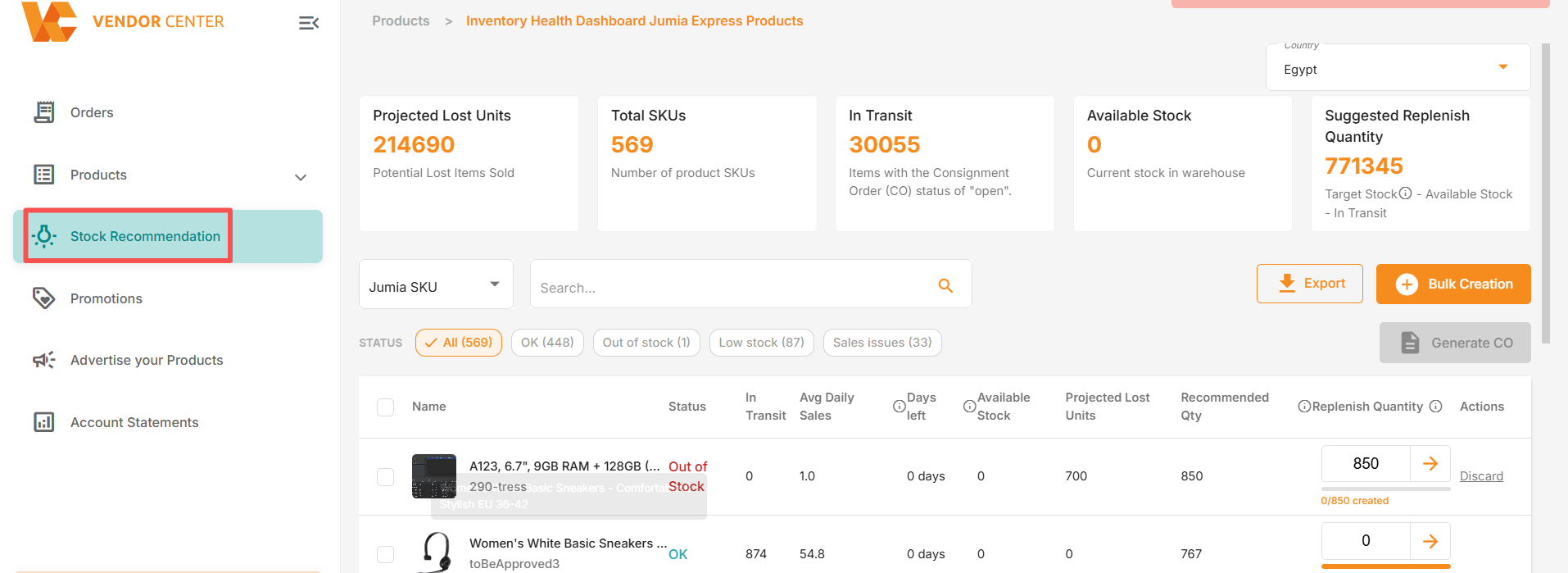
Path: Log in to Vendor Center > Stock Recommendation
What is Stock Recommendation?
Stock Recommendation is an inventory health dashboard within Vendor Center, available only to sellers with FBJ warehouses. Here, you can view the real-time inventory performance of all FBJ products and receive clear reminders about replenishment times and quantities before items go out of stock.
You no longer need to manually track inventory status or wait until items are out of stock to discover problems. The system will provide early warnings of risks and recommend reasonable replenishment quantities based on your actual sales data.
Note: Stock Recommendation is currently available to sellers with local inventory in FBJ warehouses.
1. Kanban Core Metrics
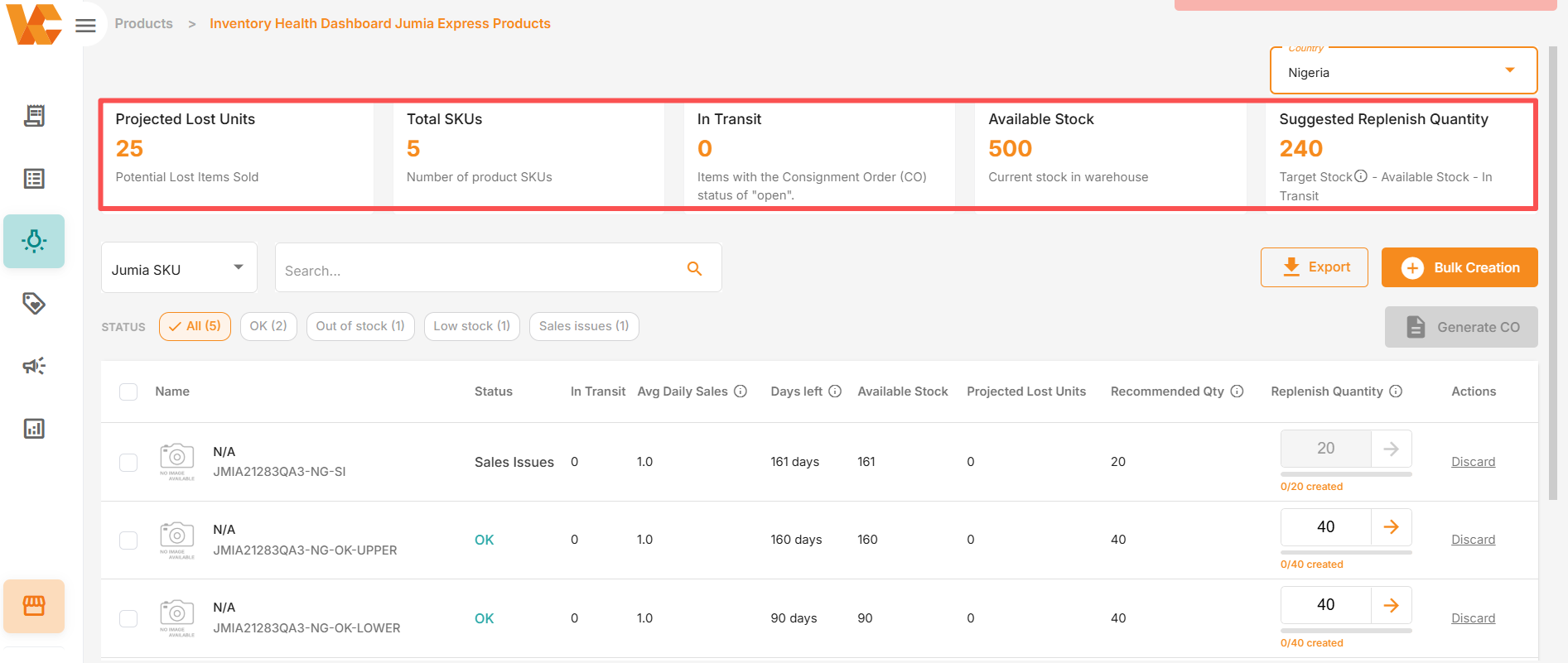
The top of the page features 5 core metrics to help you quickly understand your overall inventory health:
| Metrics | Description |
| Projected Lost Units | Potential sales volume you might lose if replenishment is not completed in time. |
| Total SKUs | Total number of products (SKUs) tracked on this dashboard. |
| In Transit Quantity | Quantity of products in created creation orders (COs) currently in transit to local Jumia warehouses. |
| Available Stock | Quantity of inventory currently in Jumia warehouses ready to be shipped to buyers immediately. |
| Suggested Replenishment Quantity | Quantity Jumia recommends you ship this time. Formula: Target Inventory − Available Stock − In Transit Quantity. |
2. Status Label Explanation
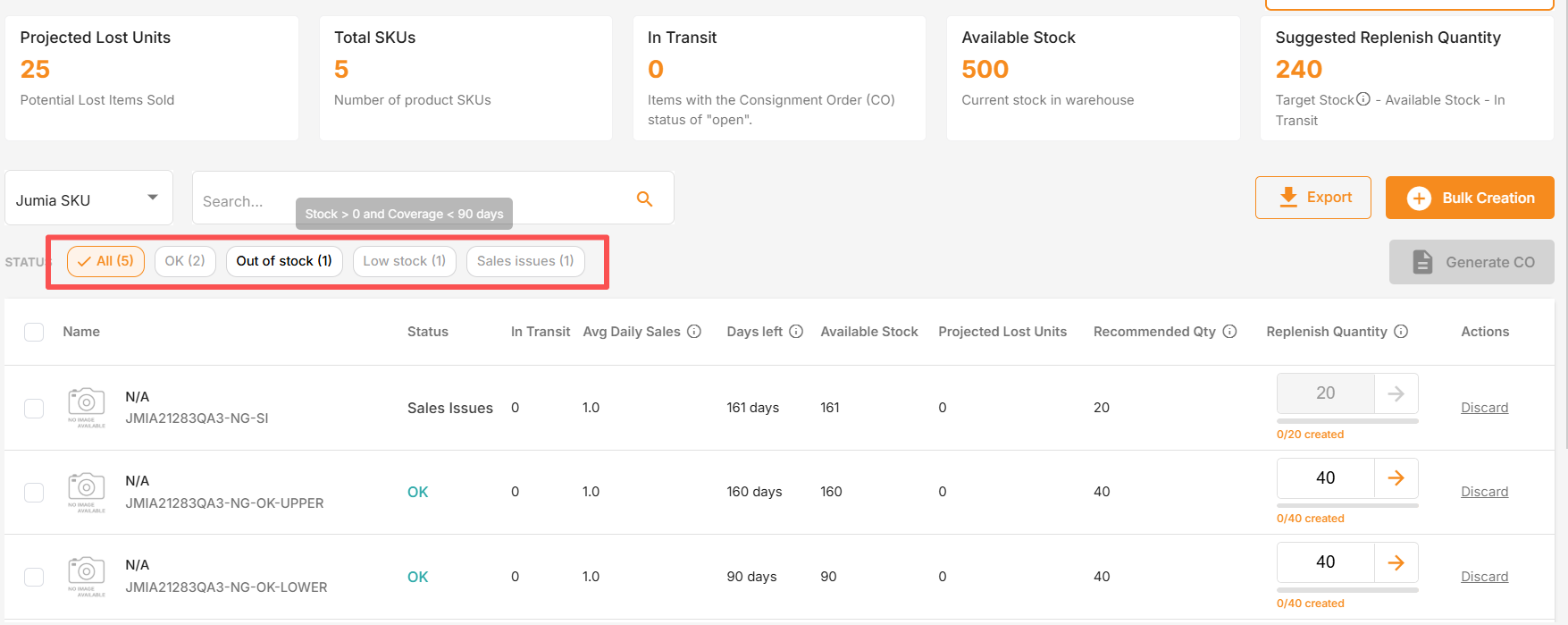
Use the status filter labels above the product list to quickly locate products that require action:
| Status | Description | Action Required |
| All | All SKUs tracked on this dashboard. | — |
| OK | Products with healthy inventory levels. | No action required. |
| Out of Stock | Products with zero stock in the warehouse. | Urgent — Replenish immediately. |
| Low Stock | Products with declining inventory facing imminent stockout risk. | Please replenish as soon as possible. |
| Sales Issues | Products with available stock but very low or zero sales. | Please check product page quality or pricing. |
Why does stockout have such a significant impact?
When a product is out of stock, its search ranking will decline, and the recovery period will be long. Every day a stockout continues results in the loss of not only that day’s orders but also subsequent organic traffic. Stock Recommendation can help you restock before a stockout occurs.
3. Product List Field Descriptions
| Field | Description |
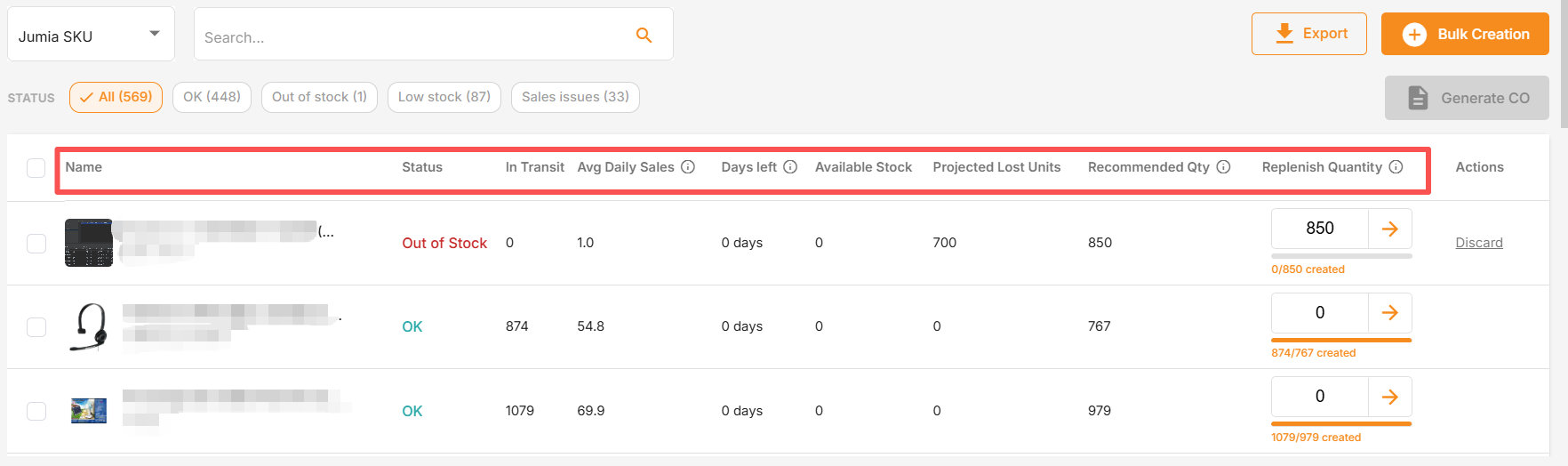
| Product Name | Product name and unique identification code. |
| Status | Current inventory status. |
| In Transit Quantity | Quantity of products in created or processing creation orders (COs). |
| Average Daily Sales | Average daily units sold for this product, used to calculate replenishment needs. |
| Days Left of Supply | Estimated days current inventory can last based on current sales velocity. |
| Available Stock | Quantity currently in Jumia warehouses available for immediate shipment. |
| Projected Lost Units | Estimated lost sales if no replenishment action is taken. |
| Recommended Replenishment Quantity | Replenishment quantity recommended by Jumia based on your sales velocity. |
| Replenishment Quantity | Editable field. Please enter the quantity you plan to ship in the next creation order (CO). |
4. How to Create a Consignment Order
A Consignment Order (CO) is a document you submit to Jumia for processing. This is the document required when sending new inventory to a Jumia warehouse. In Stock Recommendation, you can create it in three ways:
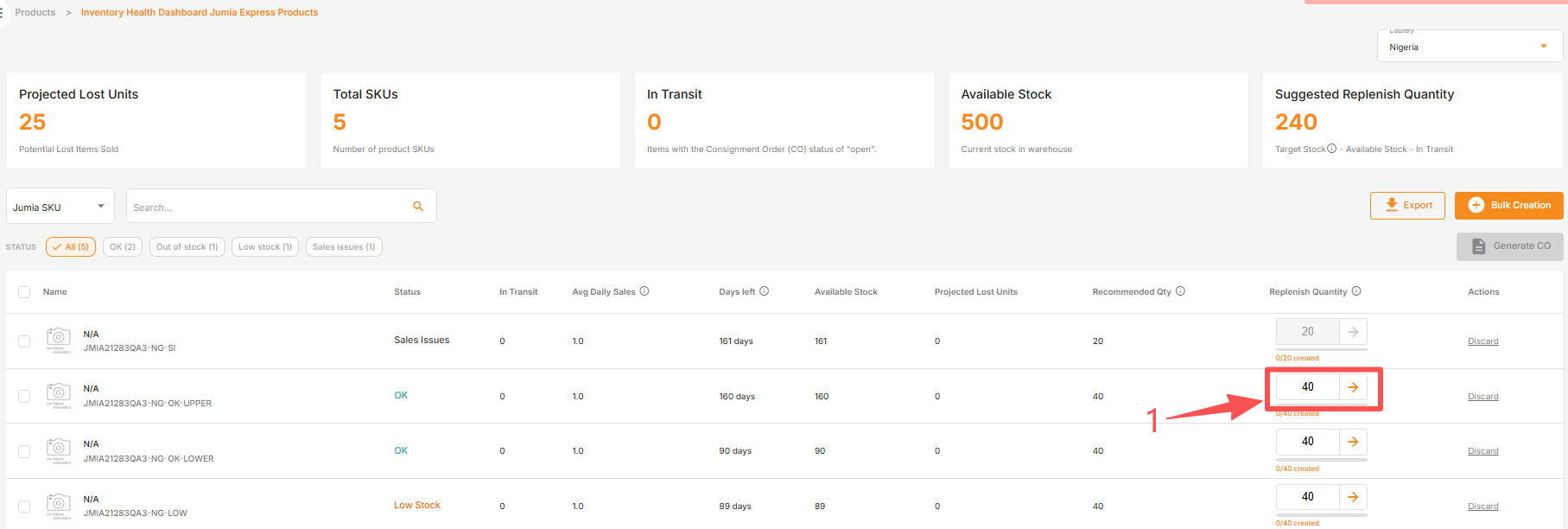
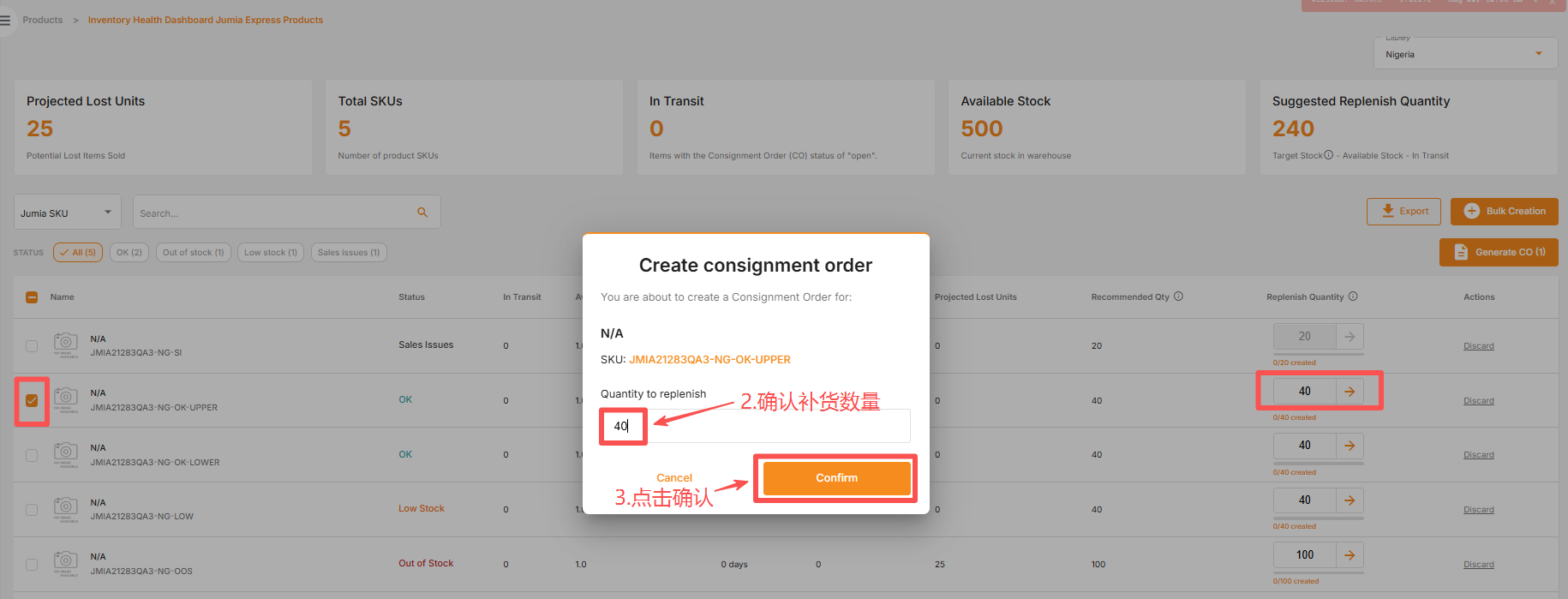
Method 1: Single SKU
Suitable for: Quickly replenishing a single specified product.
- Find the product in the list.
- Enter the quantity you wish to ship in the Replenish Quantity field.
- Click the arrow icon next to this field to create a CO for the SKU.
Method 2: Multiple SKUs
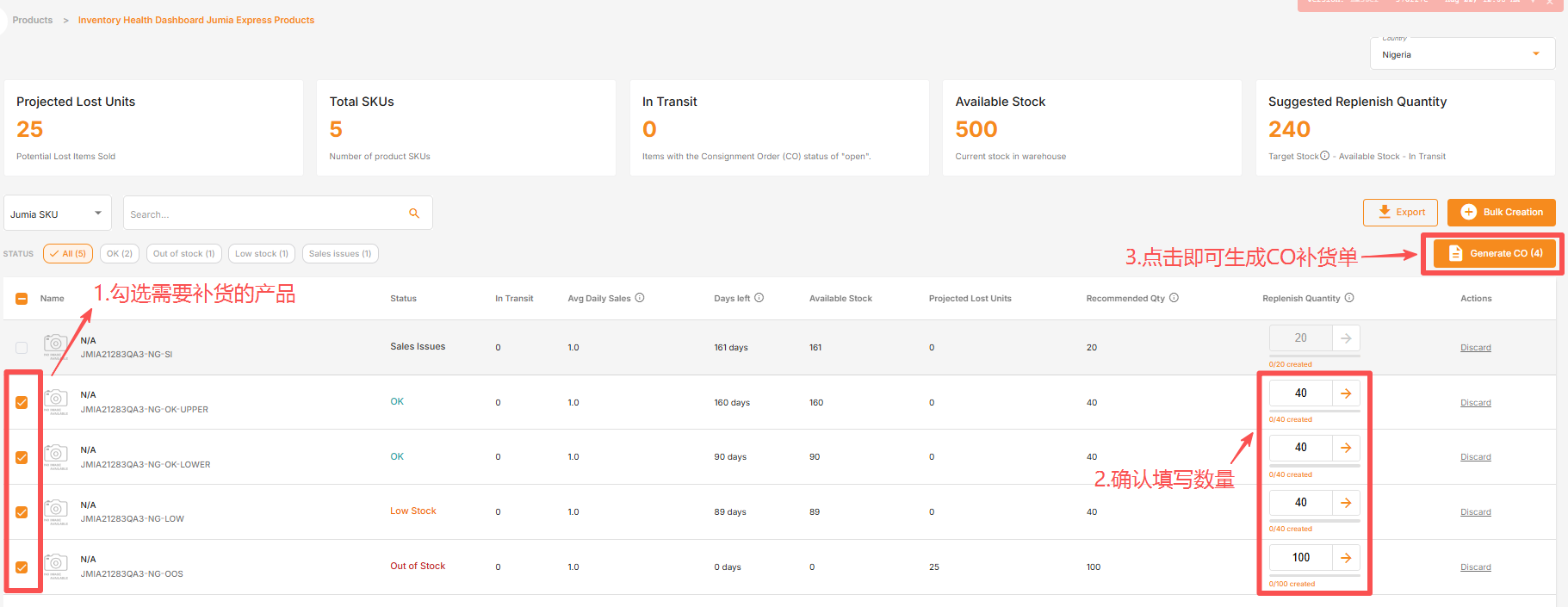
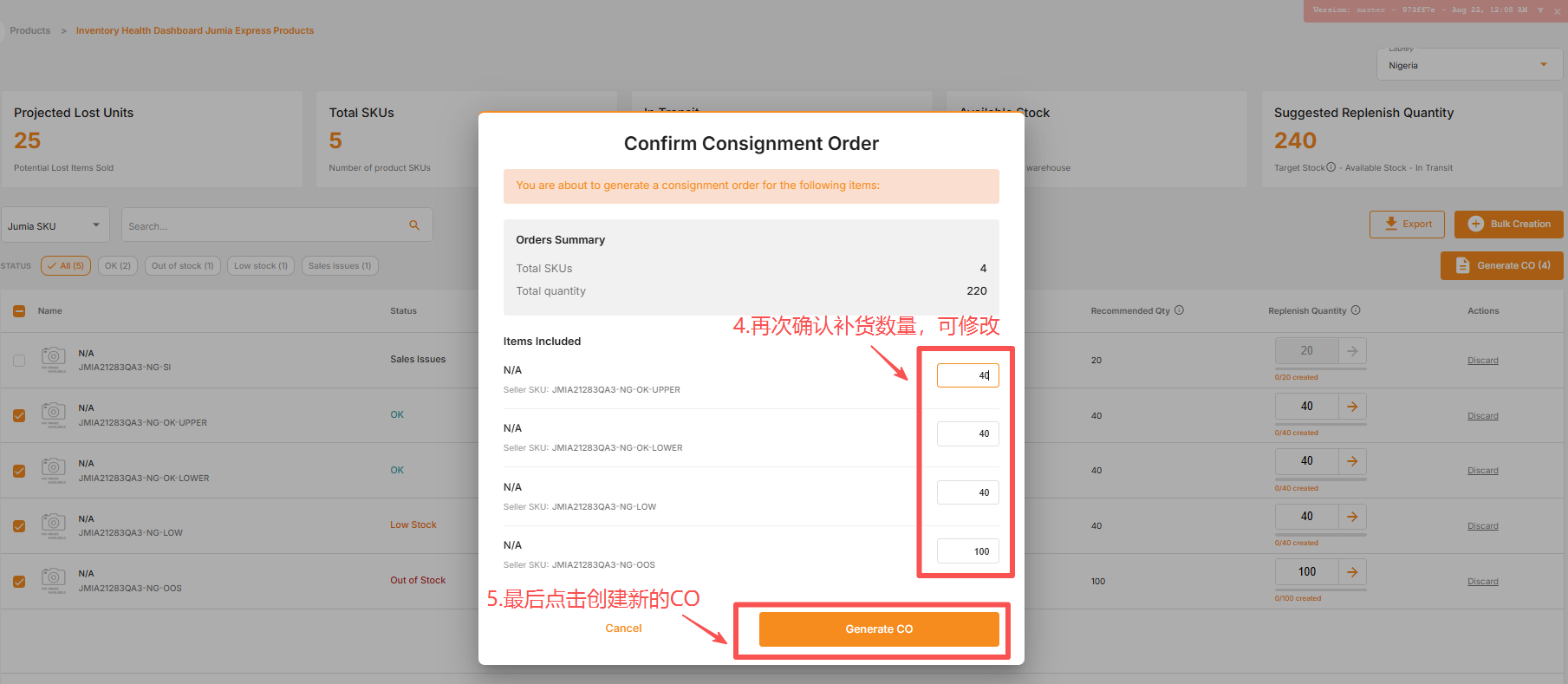
Suitable for: Replenishing multiple products at once without uploading files.
- Use the checkboxes on the left to select the products to be replenished.
- Enter the replenishment quantity for each selected SKU.
- Click Generate CO in the upper right corner.
- Check the order information and confirm.
Method 3: Batch Upload of CSV Files
Suitable for: Efficiently replenishing a large number of products at once.
- Click “Bulk Creation” in the upper right corner.
- Download the CSV template.
- Fill in your SKU and planned shipment quantity in the template.
- Upload the completed file.
Seller University Guide: Shipment Process (Vendor Center)
5. Frequently Asked Questions
1) Why can’t I see Stock Recommendation in my Vendor Center?
A. Stock Recommendation is currently only available to sellers using overseas warehouses (FBJ).
B. This module will not be visible if there have been no sales in the past 90 days, or if there are no products fulfilled by Jumia and have inventory.
2) What exactly does “Sales Issues” mean?
Products marked as “Sales Issues” have available inventory in the Jumia warehouse, but sales are extremely low or even zero. This is usually not an inventory issue, but rather a problem with the product page quality or pricing. We suggest you compare the product with similar products and check the product title, main image, detailed description, and price.
3) Can I modify the replenishment quantity recommended by Jumia?
Yes. The Replenish Quantity is editable. The recommended quantity is only a suggestion based on your sales data; you can adjust it according to your actual shipping capacity.
📹 Instructions Video: Click to View
