
Jumia has always been committed to creating a safe and compliant payment collection model to enhance the seller experience. The local currency payment collection model helps seller partners complete payment collection in a more flexible way through the use of local currency accounts, reducing losses caused by exchange rate fluctuations.
Supported countries
Nigeria NG (NGN), Ghana GH (GHS), Kenya KE (KES), Senegal SN (XOF), Côte d’Ivoire IC (XOF), Uganda UG (UGX). Other countries are in preparation, so stay tuned.
Payment collection cycle
Weekly (7 natural days). For the specific payment collection cycle, please refer to the introduction of the payment model.
Applicable objects
- Sellers without a local African bank account, using local currency account collection and currency exchange (USD, RMB, etc.) services provided by third-party payment service providers
- Sellers with a local African bank account, using their own local currency account for collection
Cooperative service providers
Contact information of local currency payment providers/agents:
|
Pyvio
|
FuturePay
|
Payful
|
YeePay
|
Yiyunhui
|
XTransfer
(信汇宝)
|
|
|
|
|
|
|
|
|
Hui+
|
Whalet
|
Super Great Level
|
Setya Goods
(驿达非)
|
Dayun
(大运)
|
Yifan
|
|
|
|
|
|
|
|
How to authorize a local currency payment account?
1. Preparation of account information
- Using a third-party payment service provider – please contact the payment service provider or agent to complete the registration and obtain a local currency bank account and related compliance materials. (For details, please click here)
- Using your own local entity account – please prepare local bank account information and related compliance materials. (For details, please click here)
2. Adding a local currency Payment method in the Jumia backend
2.1 Nigeria/Ghana/Kenya/Senegal/Côte d’Ivoire/Uganda
2.1.1 Please log in to Vendor Center, go to Profile > Payment Information
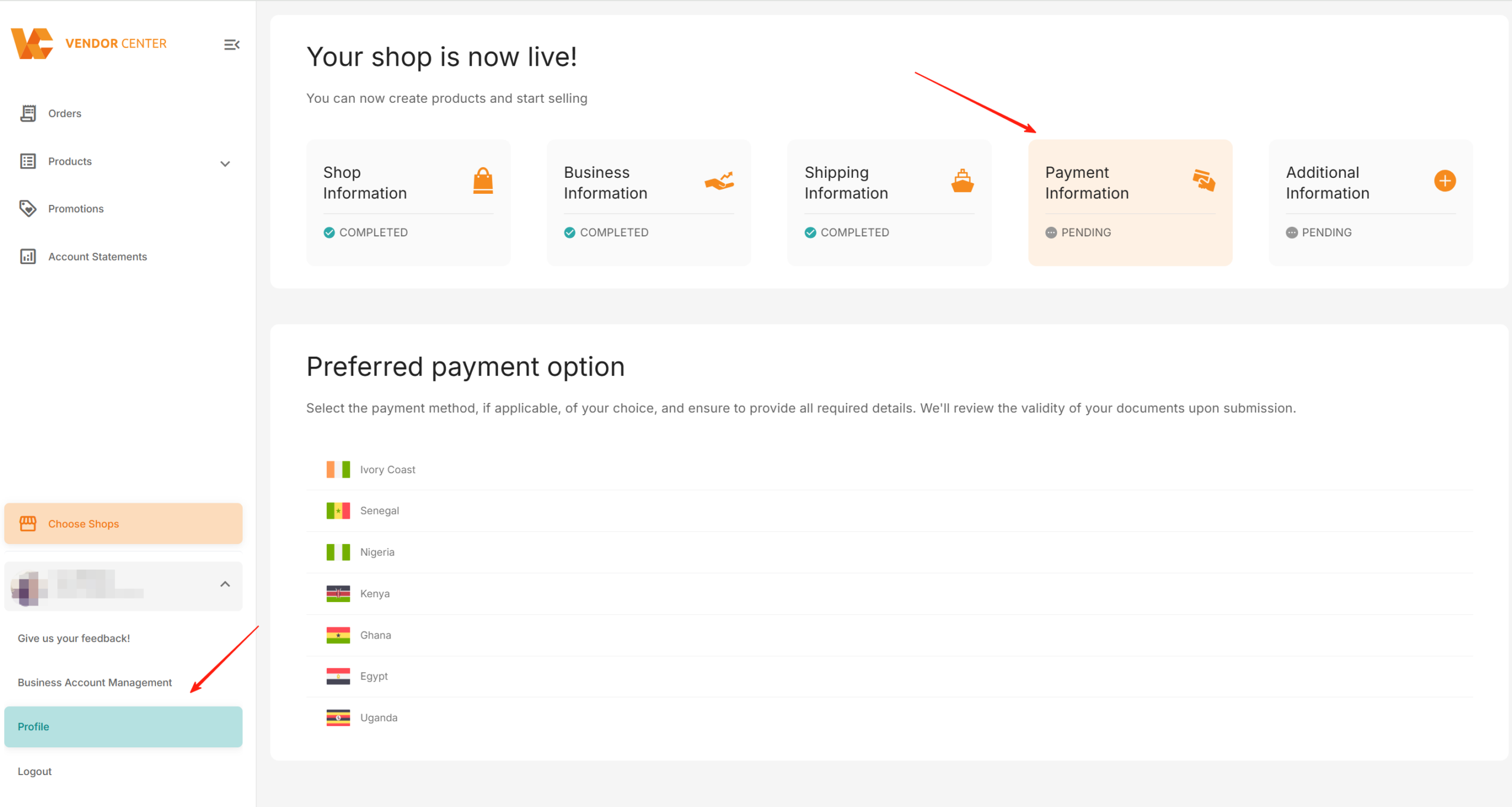
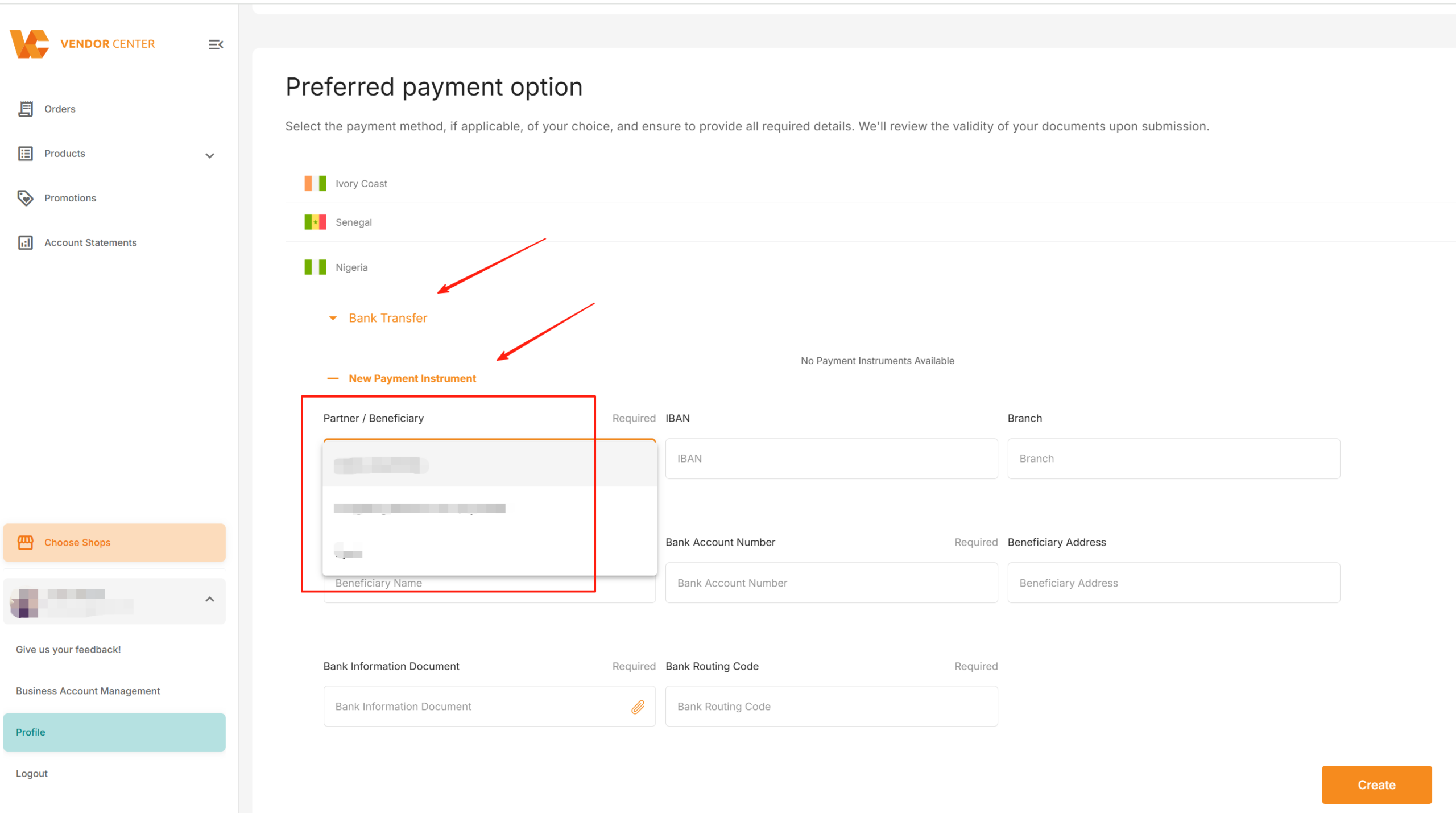
2.1.2 Select the corresponding country, choose “Bank Transfer”, click “New Payment Instrument”, and select the payment service provider for “Partner/Beneficiary”. If you use your own company’s local entity account in Africa for payment collection, please select “Seller Local Entity”.
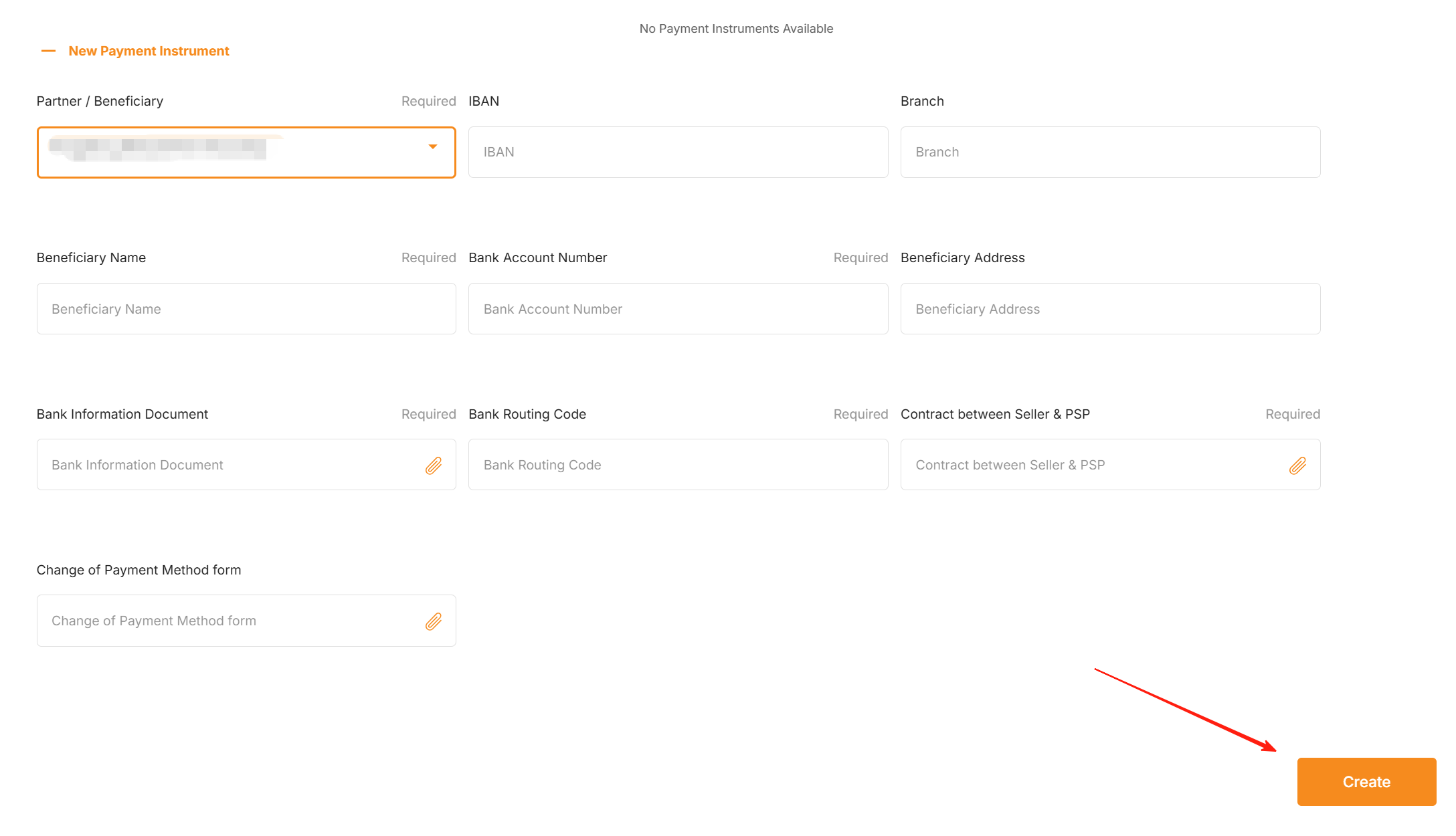
2.1.3 Fill in the local currency account information and upload the required compliance documents. Each field box marked “Required” in the upper right corner indicates that the item is [Mandatory]. Click “Create” (for details of the required compliance documents, please click)
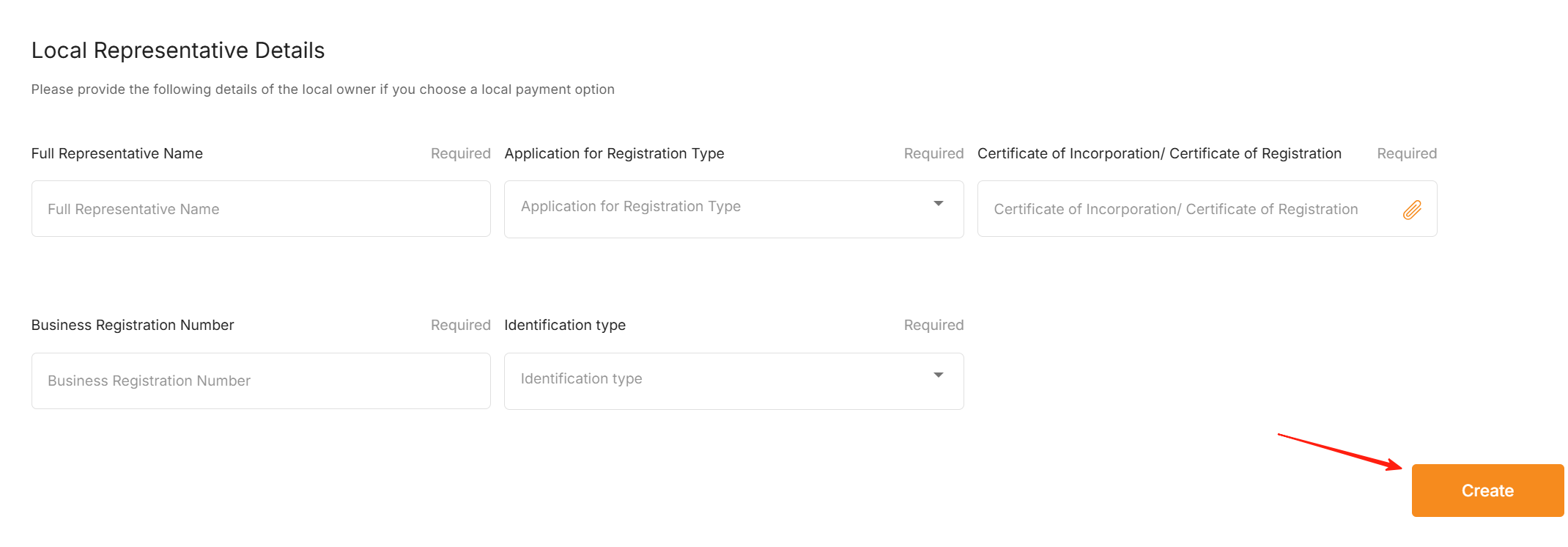
2.1.4 When using Seller Local Entity or due to compliance requirements in some countries, it is necessary to supplement more required compliance materials in “Local Representative Details”. After completion, please click “Create” (for details of the required compliance documents, please click)
2.1.5 After submission and creation, it is necessary to set it as the default payment receiving account “Preferred” to enter the review process.
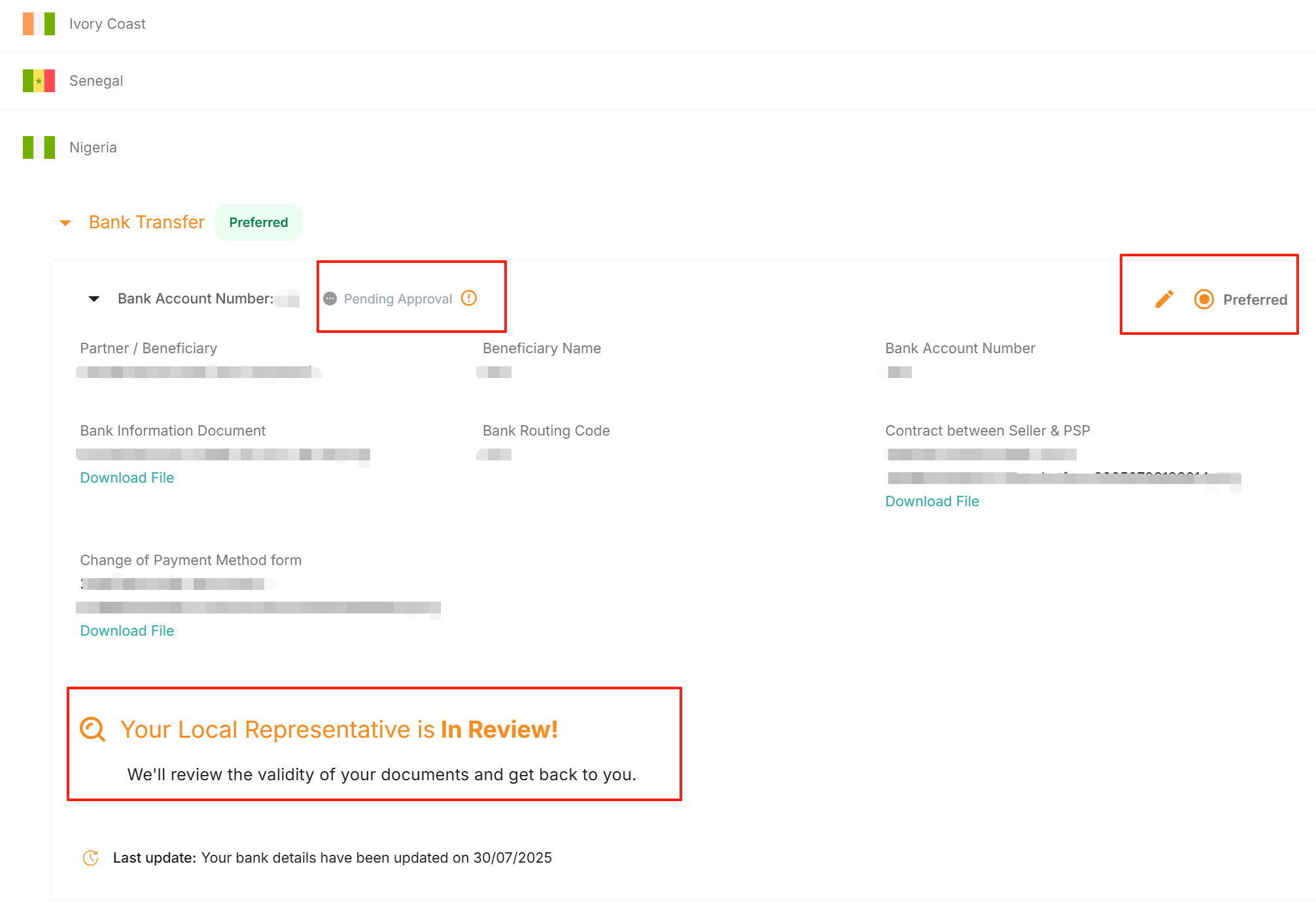
At this time, the statuses are “Pending Approval” and “Your Local Representative is In Review!”. The review result will be updated after 5 working days.
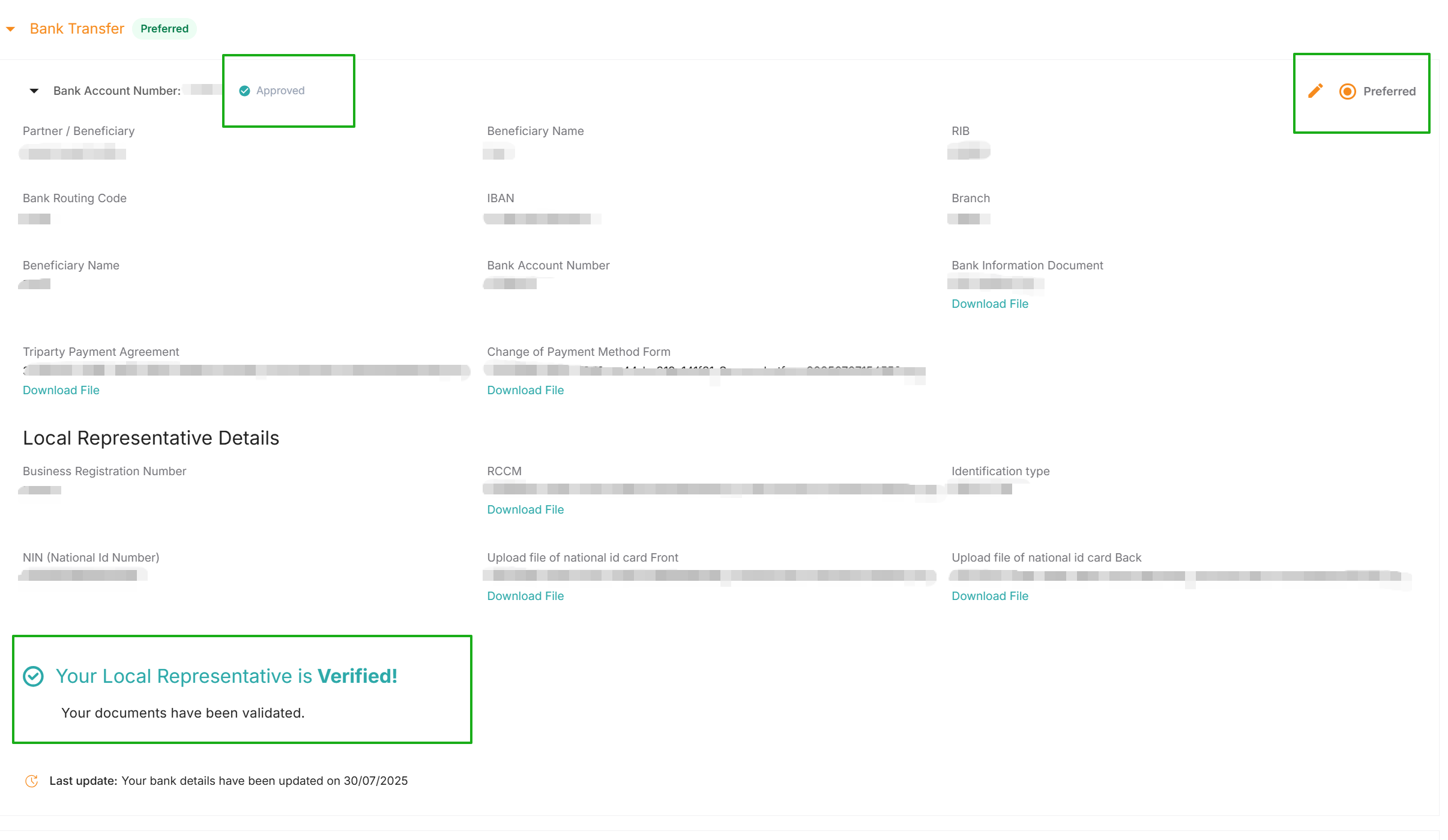
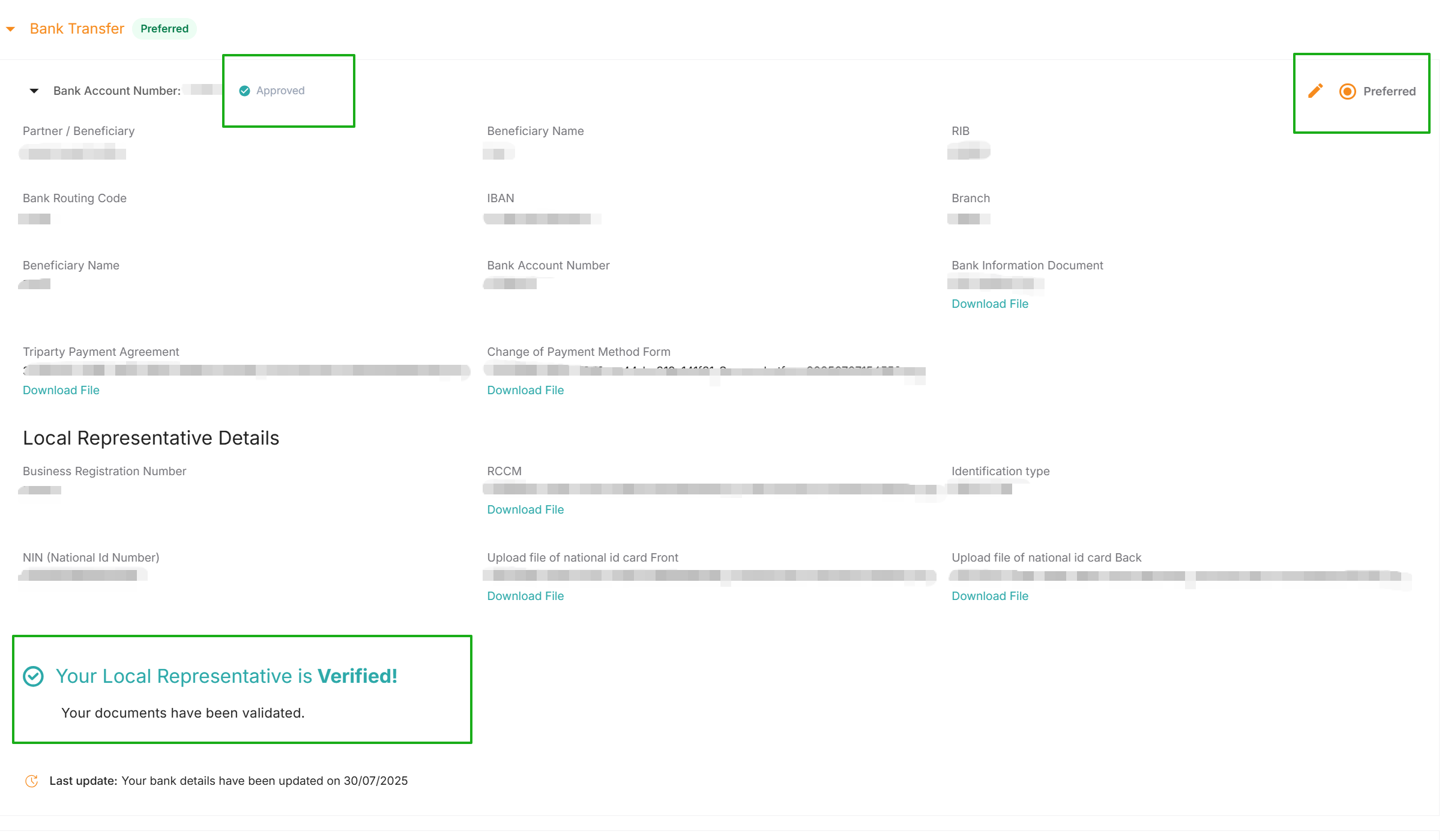
2.1.6 If the review is approved, the account will display “Approved” and “Your Local Representative is Verified!”.
The account authorization will take effect, and Jumia will remit the payment to this local account starting from the next billing cycle with a surplus amount.
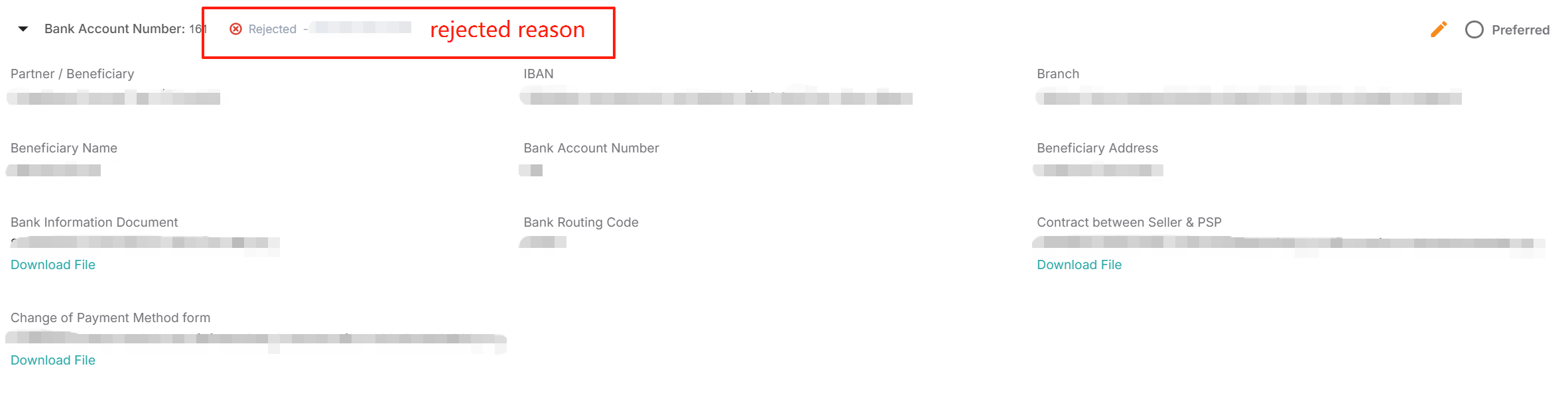
2.1.7 If the review fails, “Rejected” will be displayed, and the account cannot be authorized for payment collection.
At this time, you can request to modify the information or retransmit the correct documents according to the Rejection reason.

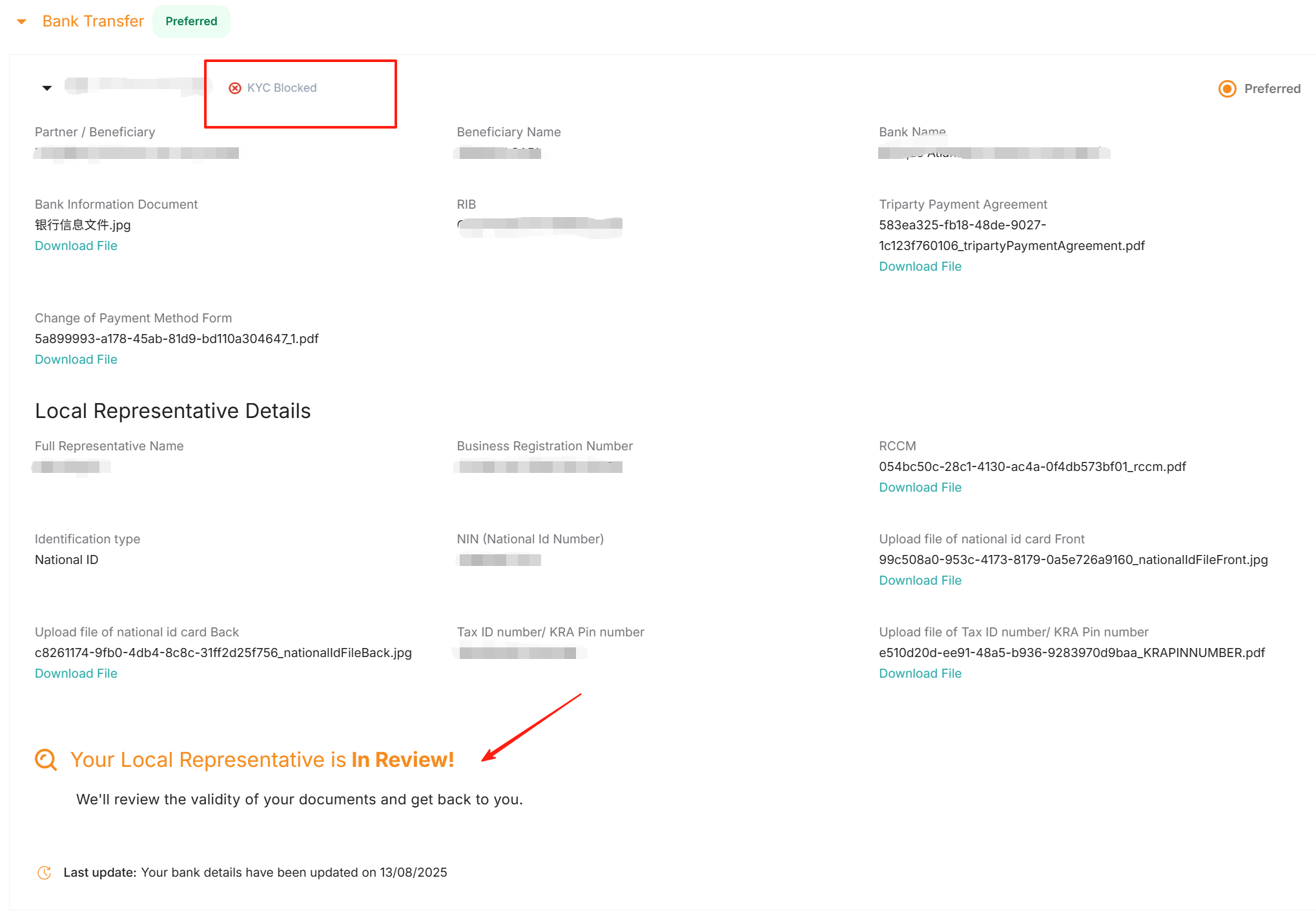
2.1.8 If the collection account shows “KYC Block” and the Local Representative review status shows “In review”, this status indicates that the qualification of the local entity (Local Representative) is currently in the review process. Please wait patiently for the review to be completed.
2.2 Egypt
2.2.1 Please log in to Vendor Center and go to Profile > Payment Information.
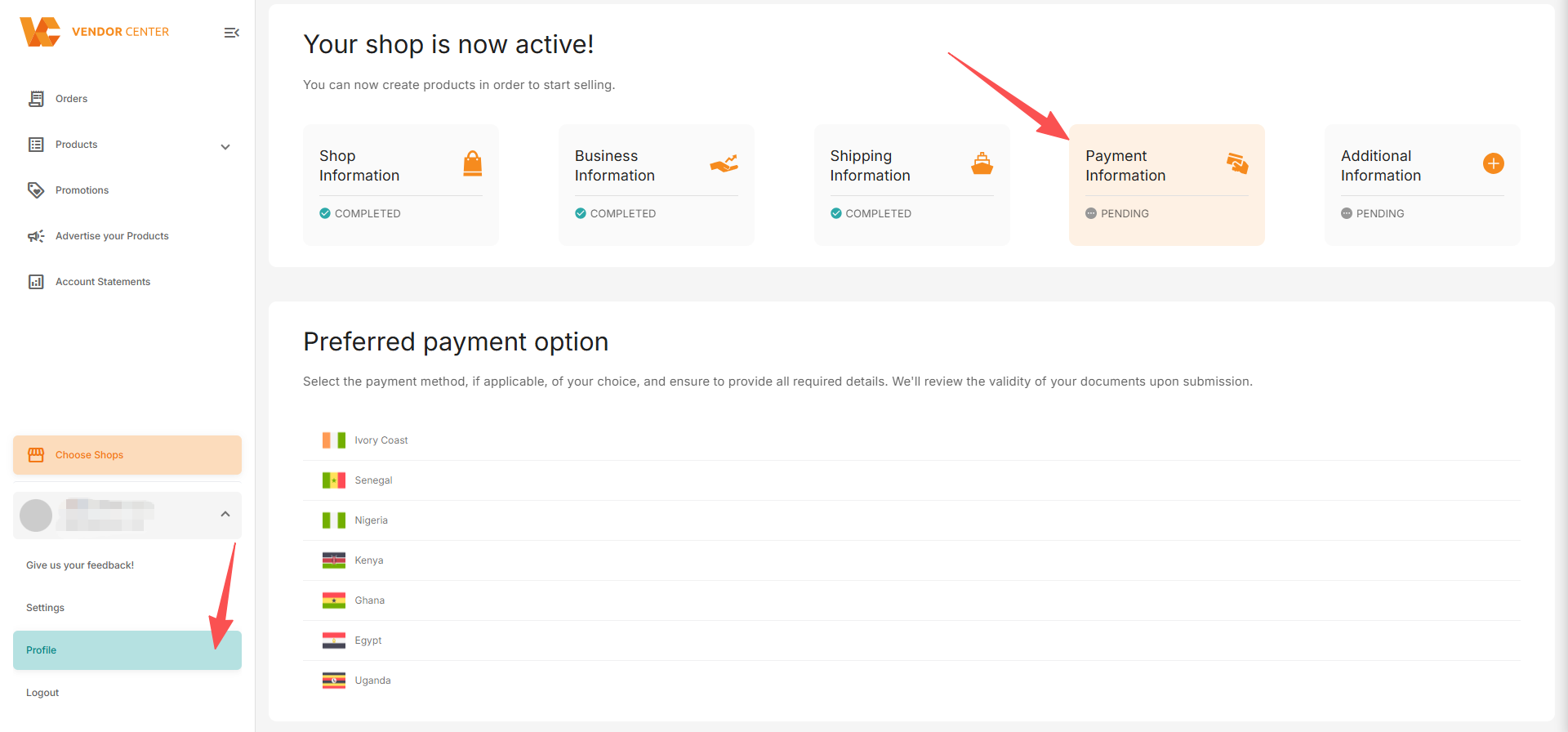
2.2.2 Select Egypt, then select “Bank Transfer,” and click “New Payment Instrument.”
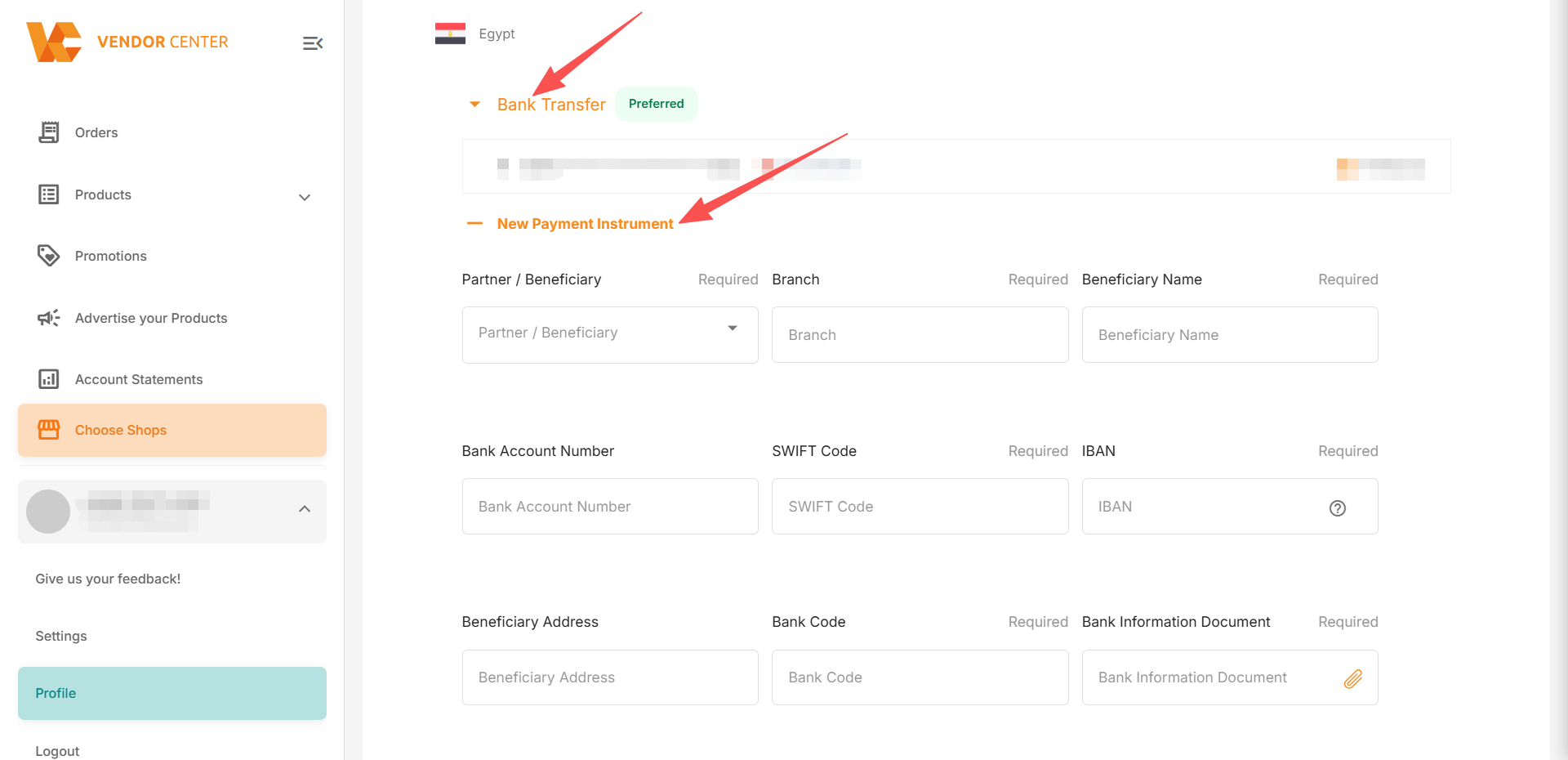
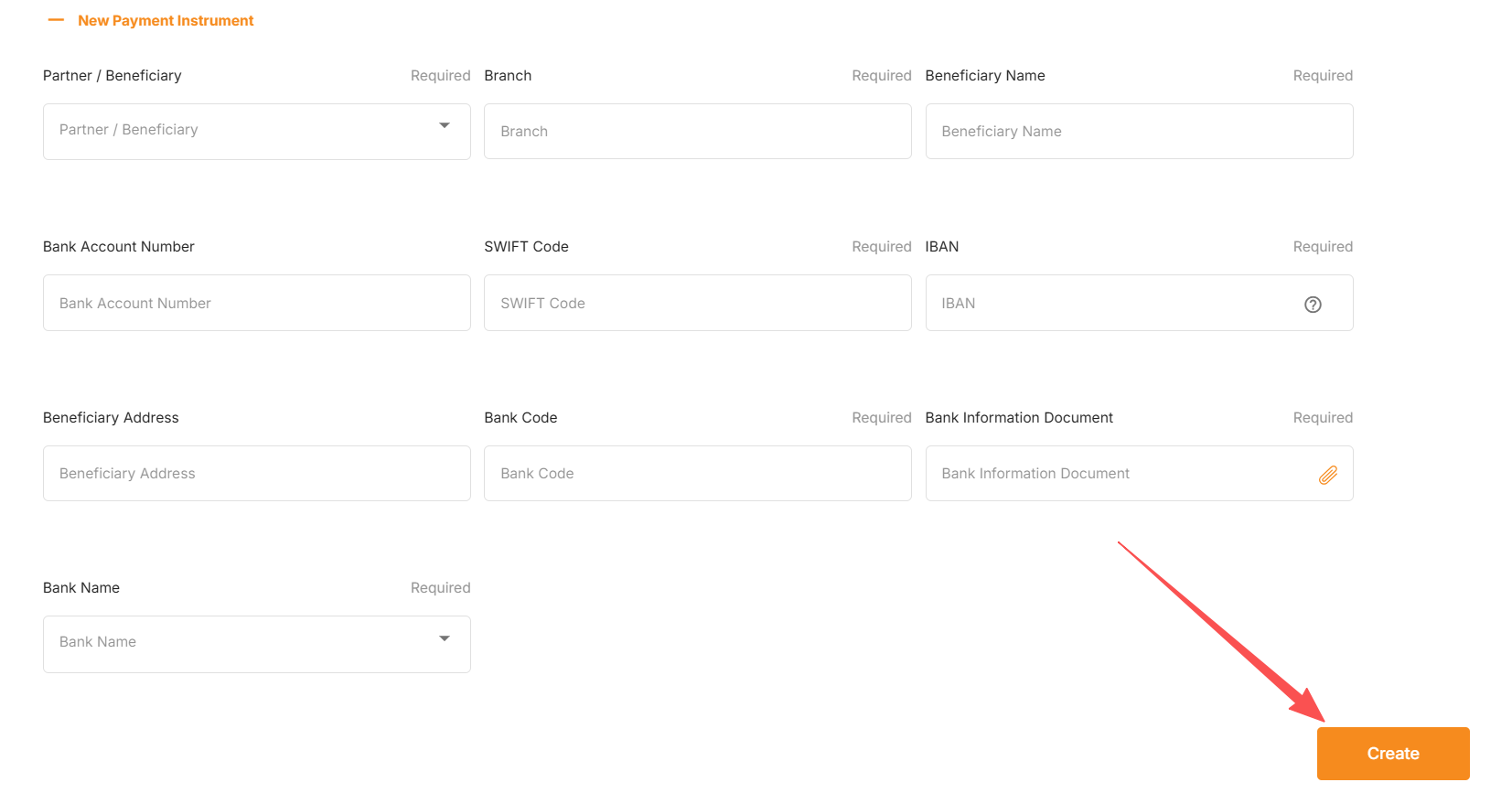
2.2.3 Fill in your local currency account information and upload the required bank documents. Fields marked “Required” in the upper right corner are mandatory. Click “Create” (click for details of required documents).
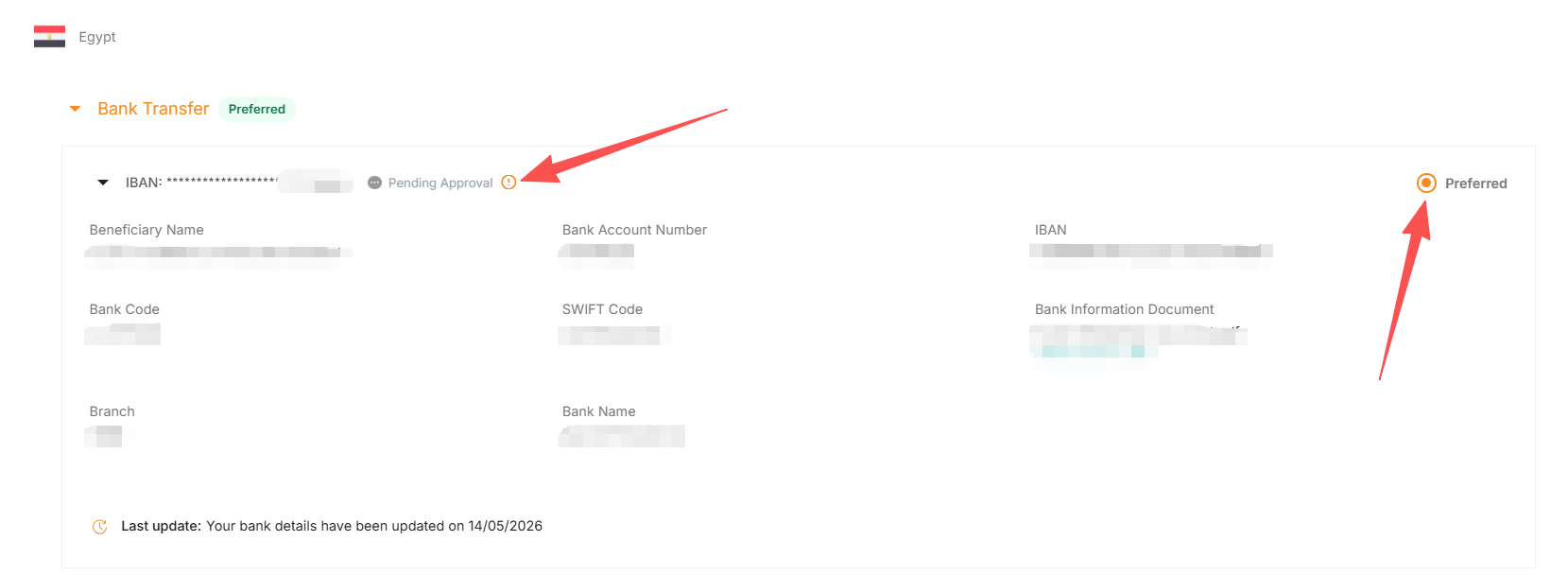
2.2.4 After submitting the creation, you need to set it as the default payment account (“Preferred”) for it to enter the review process.
The status at this point is “Pending Approval.” The review result will be updated after 5 business days.
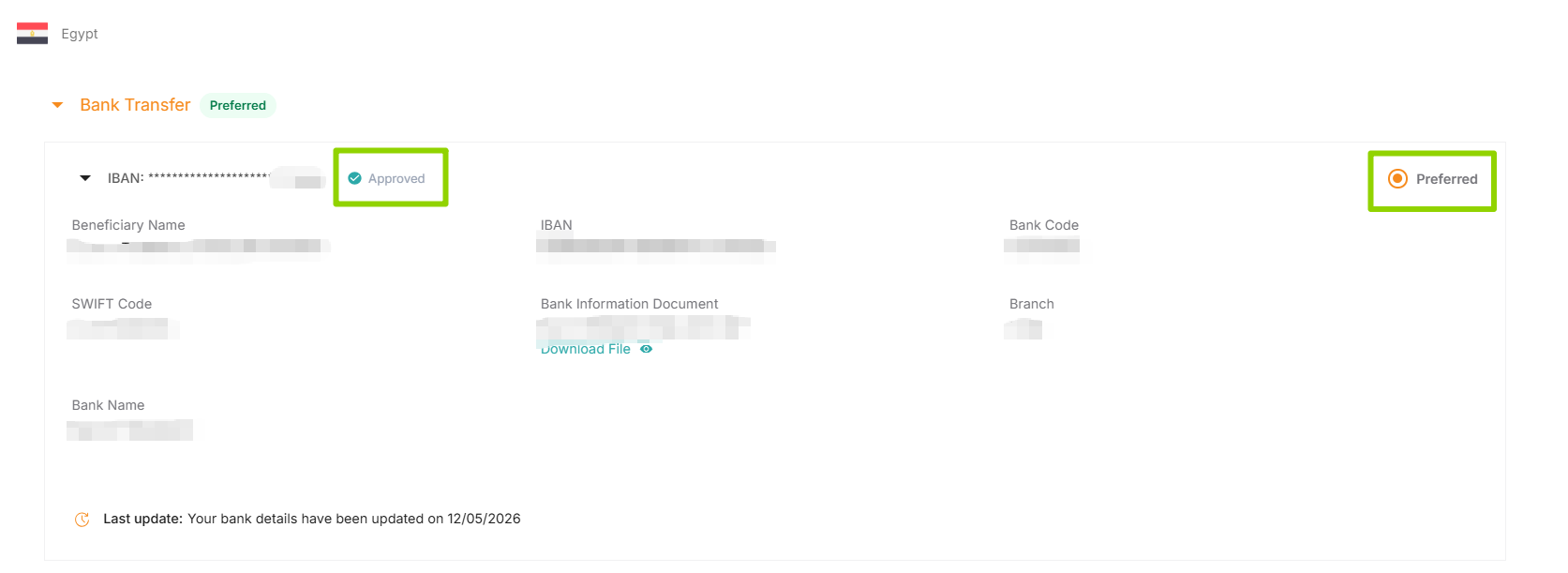
2.2.5 If the review is approved, the account will show as “Approved.”
Account authorization is effective. Starting from the next payment period with a surplus, Jumia will make payments to this local account.
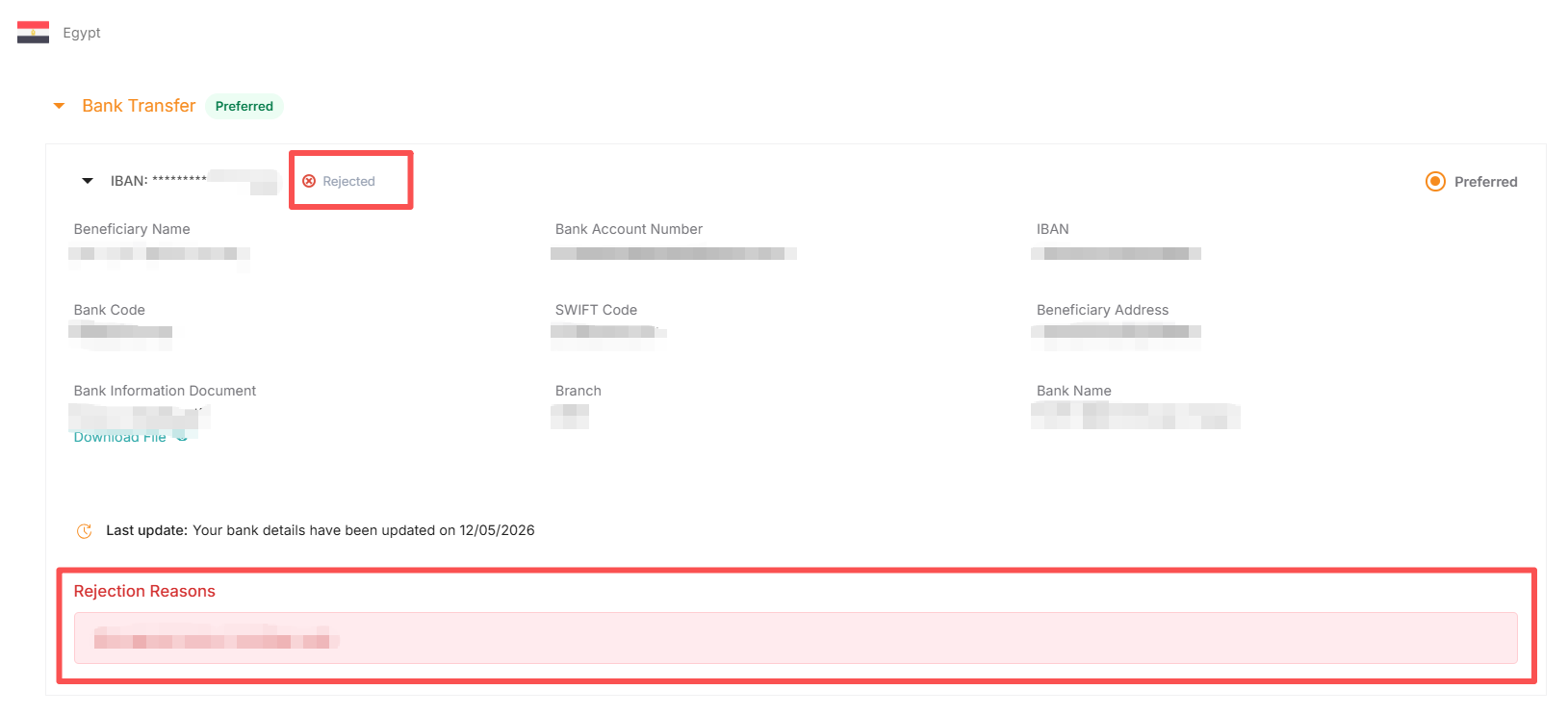
2.2.6 If the review fails and displays “Rejected”, the account cannot authorize the repayment.
In this case, you can modify the information or resubmit the correct file according to the Rejection reason.
3. Delete the local currency payment method in the Jumia backend
3.1 Select the corresponding country, select “Bank Transfer”, and find the “Bank Account Number” you want to delete.
Please note: The “Bank Account Number” marked as “Preferred” cannot be deleted. If you need to delete it, please first create a new Bank Account Number and set it as “Preferred”.
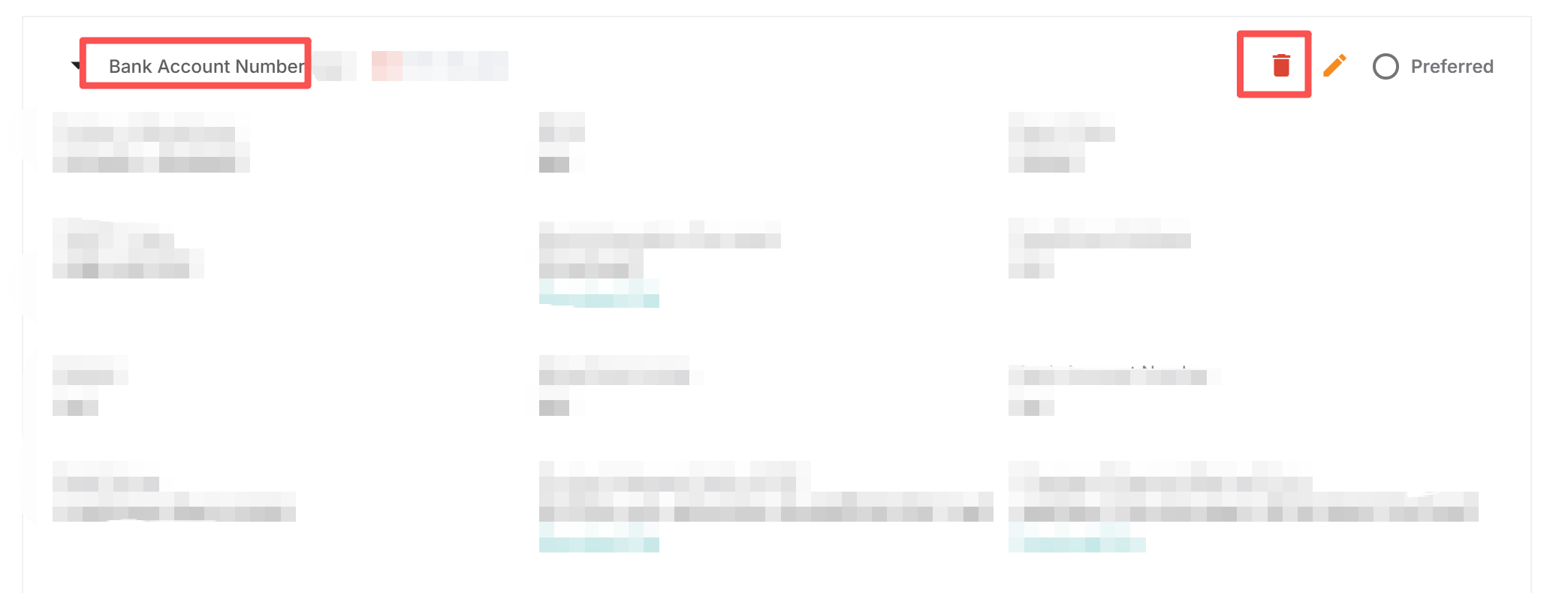
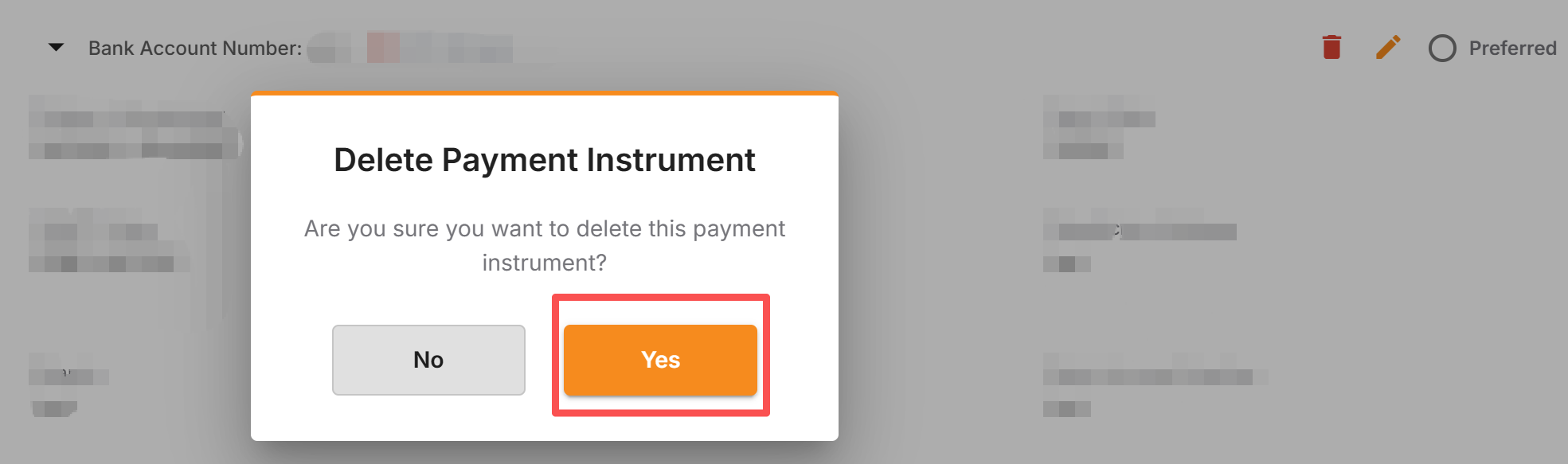
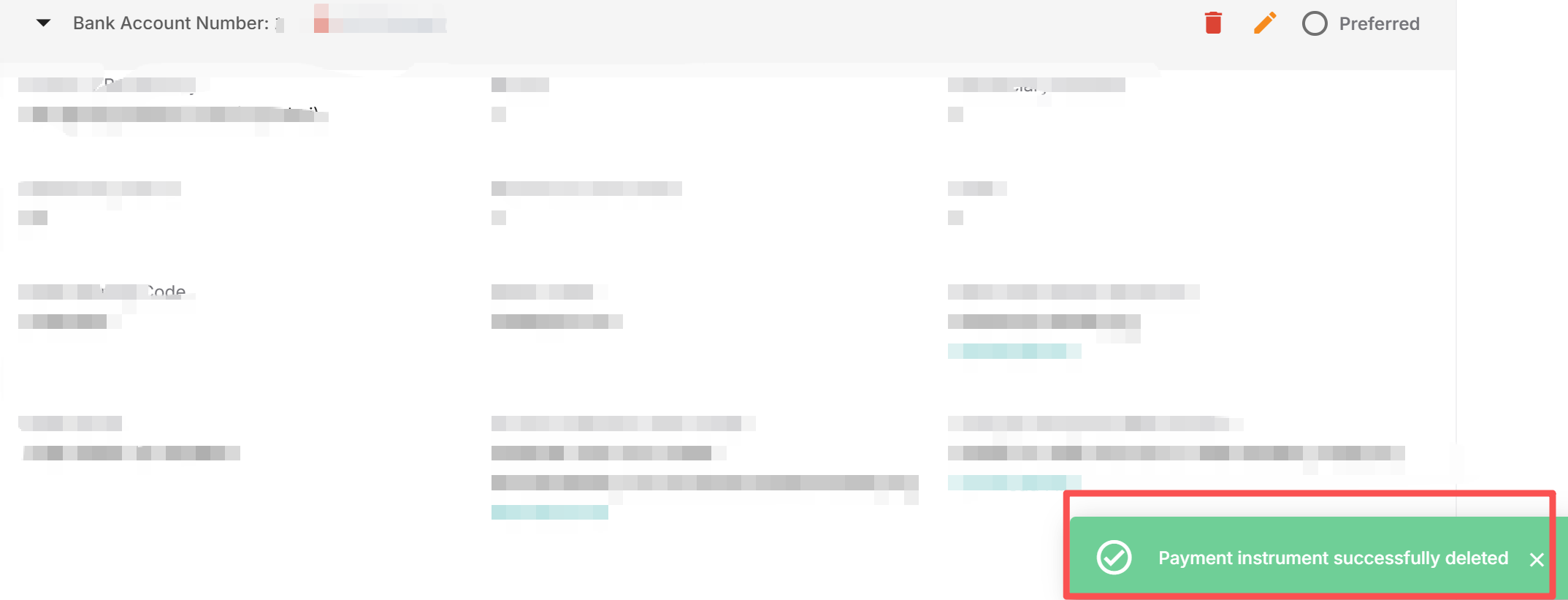
3.2 Click the red trash bin icon in the upper right corner. At this time, a confirmation window will pop up on the screen, asking if you are sure you want to delete. If you need to delete, please click the “Yes” button in the pop-up window to complete the operation.
Please note: Once this operation is completed, the data cannot be recovered.
3.3 After clicking “Yes”, a prompt “Payment instrument successfully deleted” appears in the lower right corner of the page, which indicates that the “Bank Account Number” has been successfully deleted.
4. Interpretation of Review Status
The review process for local currency Payment accounts includes two parts: bank account number + corresponding local entity qualifications. The Payment account can only take effect after both parts have been approved.
- Interpretation of the review status of Bank Account Number:
- KYC blocked: The qualification of the local entity (Local Representative) for this receiving account is under review. At this time, the synchronization prompt at the bottom of the page is “Your Local Representative is In Review!”. Please wait for the review to complete.
- Pending approval: This receiving account is under review.
- Reject: The information is incorrect. Please make corresponding modifications according to the prompts.
- Approved: Approved
- Interpretation of the review status of Your Local Representative:
- In Review: Under review
- Rejected: The information is incorrect. Please make corresponding modifications according to the prompts.
- Verified: Approved
5. Sellers settling in local currency must meet the following conditions simultaneously
Suppliers who choose local currency settlement only need to meet the following two requirements at the same time to successfully receive Payments.
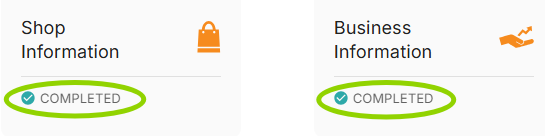
5.1 The store identity verification (KYC) is passed. The inquiry path is as follows: Log in to VC > Profile > Both the Shop information section and the Business information section are COMPLETED. Example:
5.2 Effectiveness of the payment account: Both the bank account number and the local entity qualification have passed the review. Example:
6. Interpretation of Reasons for Failed Review
- Interpretation of reasons for rejection of Bank Account Number review:
| Reject Reason_EN | Explaination_CN |
| Please rename the attachment. Only Latin alphabet characters are allowed | 请重命名附件,仅允许使用英文字母 |
| Document not valid/readable. | 文档无效/不可读 |
| Document password encrypted. Remove password. | 文档密码已加密,请删除密码 |
| Handwritten documents are not accepted. | 不接受手写文件 |
| Cheques are not accepted. | 不接受支票 |
| Invalid/Closed bank account/RIB/IBAN/Nuban | 无效/已关闭的银行账户/RIB/IBAN/Nuban |
| Missing bank stamp. | 缺少银行印章 |
| Missing bank account number/RIB/IBAN/Nuban | 缺少银行账号/RIB/IBAN/Nuban |
| Missing bank name | 缺少银行名称 |
| Missing phone number | 缺少电话号码 |
| Missing beneficiary name | 缺少受益人姓名 |
| Missing business registration number | 缺少商业登记号码 |
| Missing sort code/routing code/bank code | 缺少银行代码Sort code/routing code/bank code |
| Remove spaces from RIB/IBAN/bank account number | 请删除 RIB/IBAN/银行账号中的空格 |
| Wrong bank account number/RIB/IBAN/Nuban | 错误的银行账号/RIB/IBAN/Nuban |
| Wrong beneficiary name. No special characters allowed. | 受益人姓名错误,不允许使用特殊字符 |
| Wrong business registration number | 商业登记号码错误 |
| Wrong bank name | 银行名称错误 |
| Wrong branch code | 错误的分行代码 |
| Wrong phone number | 错误的电话号码 |
| Wrong sort code/routing code/bank code | 错误的分类代码/路由代码/银行代码 |
- Rejection of local entity qualification review (Your Local Representative is Rejected! ) Reason explanation:
| Reject Reason_EN | Explaination_CN |
| Missing change of payment form: Fill and provide the required document | 缺少Change of Payment Method Form,请补充并重新提交 |
| Change of payment form not signed by the seller: Sign the form and send it back | Change of Payment Method Form未签署,请修改并重新提交 |
| Missing tripartity agreement: Fill the form, sign and then upload it on VC | 缺少Triparty Payment Agreement,请重新上传提交 |
| Agent appointed not yet approved: Appoint a different agent for the time being | 回款代理人尚未获得批准,请咨询你的支付服务商或暂时委任其他代理人 |
| KYC for the seller not yet green: Please review your information at Profile >Business information, then resubmit for Seller KYC review | 店铺审核尚未通过,请在Vendor Center>Profile >Business information重新提交,以再次触发店铺审核 |
| Change of form not correctly filled out: Fill all the sections in the form and sign it | Change of Payment Method Form填写不正确,请修改并重新提交 |
| Mismatching between the store name in the forms and the one on VC: Ensure that the documents provided are from the correct store | Change of Payment Method Form中的店铺名称与后台店铺名称不匹配,请修改并重新提交 |
| Tripartity agreement not signed by all parties(seller or agent): Sign the document and upload it again | Triparty Payment Agreement未完成签署(缺少Seller或Agent),请修改并重新提交 |
| Triparty agreement not signed by the correct agent: Get the document signed by the correct agent | Triparty Payment Agreement里Agent签署人与Local Representative提交的不匹配,请修改并重新提交 |
| Missing the new version of the triparty agreement(SN and IC): Fill out and sign the new version | Triparty Payment Agreement模板有误,请参考此处CI/SN合同模板,请修改并重新提交 |
Common Questions and Answers
1) How to switch third-party payment collection service providers?
- When submitting an application to switch the local currency account, you can choose to add a new local currency account or specify an existing account and set it as the preferred account. After the switch, this account will trigger a new round of review. Once the review is approved, the system will automatically use this preferred account for payment collection.
2) Is the local currency payment collection cycle the same as that for USD?
- Local currency is collected weekly, while USD is collected every two weeks.
3) I have set up multiple Payment accounts; can they be used simultaneously?
- No, only one Payment account can be used per payment period. The system will default to using the account you marked as “Preferred”.
4) If there are multiple Payment accounts under a country with Approved status, will switching the default (Preferred) account trigger a re-review?
- No, setting an already approved account as the default (Preferred) account does not require re-review.
5) If I change the account in VC, will the pending payments generated before automatically adopt the newly selected payment collection method?
- Yes, the system has implemented automatic synchronization. Once the payment method is set to ‘Preferred’ and approved, all historical outstanding payments will automatically use the newly selected payment method, and payments will be arranged in the week following the account change.
