
New Feature: Jumia SKU Search Now Live!
The Jumia SKU Search function is now officially available in the Vendor Center (VC)! This feature is designed to help sellers manage products more efficiently by quickly locating and processing tasks related to specific SKUs.
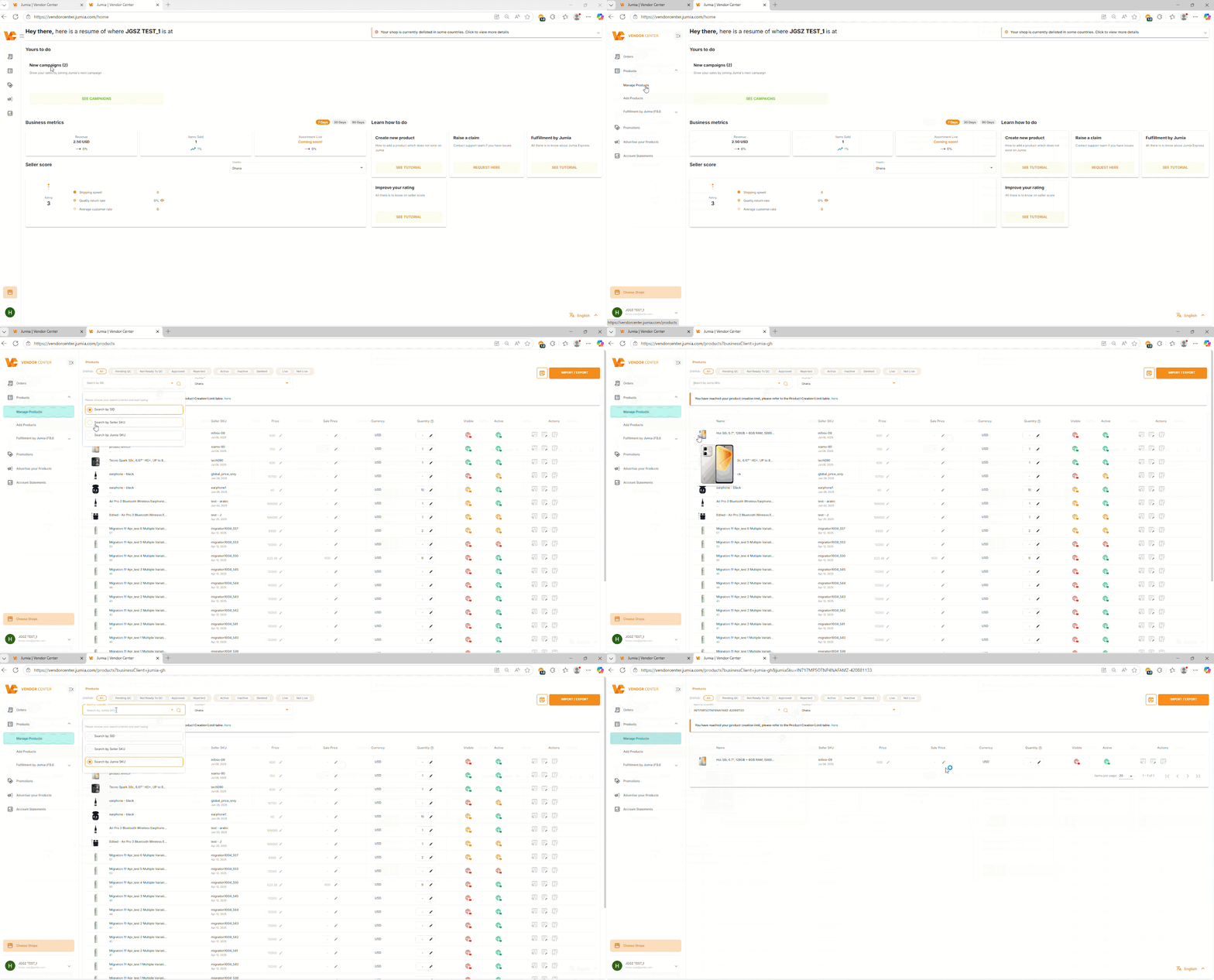
How to use the Jumia SKU Search function:
- Log In: Sign in to your Jumia Vendor Center account.
- Access “Manage Products”: On the left-hand navigation bar of the Jumia VC interface, find and click the “Manage Products” option.
- Select Search Type: Once on the product list page, you will see a search bar. By default, the search may be set to other identifiers (such as SID). Click the dropdown arrow next to the search bar and select “Search by Jumia SKU” as your search type.
- Enter SKU & Search: Type the specific Jumia SKU you are looking for into the search bar. The system will automatically execute the search as you type or after you press enter.
- View Results: The search results will display only the product that exactly matches the Jumia SKU provided, allowing you to locate specific items instantly.
We believe this new feature will significantly enhance the operational experience for sellers on the Jumia platform.
